SAD_GETAPPL
This service operation enables the user to retrieve a specific admissions application from the Campus Solutions system. The application may exist in the admissions staging tables or in the admissions production tables. Saved applications reside in the staging tables and submitted applications reside in the production tables.
| Get Application Service Operation Description and Features | Details |
|---|---|
|
Description |
Use this service operation to retrieve a saved or submitted application using the ADM_APPL_NBR key. An online application can obtain the ADM_APPL_NBR application key by calling the SAD_GETAPPLS service, which retrieves a summary of all the applications associated with the current authenticated user. The SAD_GETAPPL operation can operate under applicant or administrative modes. When using applicant mode, the application data returned is restricted to those applications entered previously by the authenticated online application user. When using administrator mode, the application data returned from the admissions production tables is subject to application center row level security. |
|
Users |
|
|
Processing |
This service operation performs the following steps:
|
|
Output |
After completing the processing steps, the service operation returns a single application if it exists in the staging or production tables. All the application details along with constituent details are returned, if the application exists. |
|
Error Conditions |
The following conditions result in a service error:
|
Input Message: SAD_GETAPPL_REQ
This image shows the input parameters that the SAD_GETAPPL service operation receives from an online application.
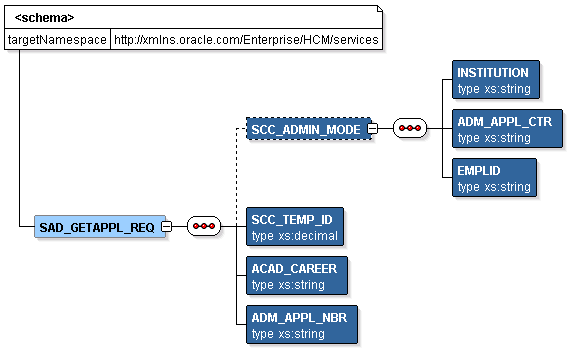
Required data that the online application must supply to the service operation in Non-administrator (Applicant) mode:
-
Academic Career
-
Application Number
Required data that the online application must supply to the service operation in Administrator mode:
-
Institution
-
Admission Application Center
The following is an example of the SAD_GETAPPL_REQ message that the SAD_GETAPPL service operation receives from an online application:
<?xml version="1.0"?>
<SAD_GETAPPL_REQ>
  <ADM_APPL_NBR>00024656</ADM_APPL_NBR>
  <ACAD_CAREER>UGRD</ACAD_CAREER>
</SAD_GETAPPL_REQ>
Output Message: SAD_GETAPPL_RESP
When the Integration Broker receives the SAD_GETAPPL_REQ message, it responds with the SAD_GETAPPL_RESP message.
This image shows the output parameters that the SAD_GETAPPL service operation passes to the online application.

Note that the SAD_GETAPPL_RESP schema includes the Application entity (ADM_APPL_DATA) and Constituent entity XSD schemas.
The following is an example of the SAD_GETAPPL_RESP message that the SAD_GETAPPL service operation transmits to the online application:
<?xml version="1.0"?>
<SAD_GETAPPL_RESP>
  <ADM_APPL_DATA>
   <!-- Application data shape -->
  </ADM_APPL_DATA>
  <CONSTITUENT>
   <!-- Constituent data shape -->
  </CONSTITUENT>
</SAD_GETAPPL_RESP>
Fault Message: SAD_FAULT_RESP
Refer to the SAD_FAULT_RESP message example in the SAD_CREATEAPPL section.