SAD_GETATTACH
This service operation enables the user to retrieve the byte content of an admissions application attachment from the Campus Solutions system.
| Get Attachment Service Operation Description and Features | Details |
|---|---|
|
Description |
Use this service operation to retrieve an attachment associated with the admission application. The online application must encode the attachment byte content in Base64 format when a user saves or submits the application data through AAWS. Subsequently, the online application can use SAD_GETATTACH to retrieve the attachment. After retrieval, the online application must decode the attachment. The applicant or administrator can then use the appropriate file type viewer to view the attachment. The attachment is stored within the Campus Solutions attachment framework in a database table. You can use the Application Transactions or Maintain Applications components to access the application attachments. |
|
Users |
|
|
Processing |
This service operation performs the following steps:
|
|
Output |
After completing the processing steps, if the attachment exists, the service operation returns the attachment data to the online application. |
|
Error Conditions |
The following conditions result in a service error:
|
Note:
The Online Application may issue multiple calls to the SAD_GETATTACH service operation in order to retrieve multiple Application attachments.
Input Message: SAD_GETATTACH_REQ
This image shows the input parameters that the SAD_GETATTACH service operation receives from an online application.
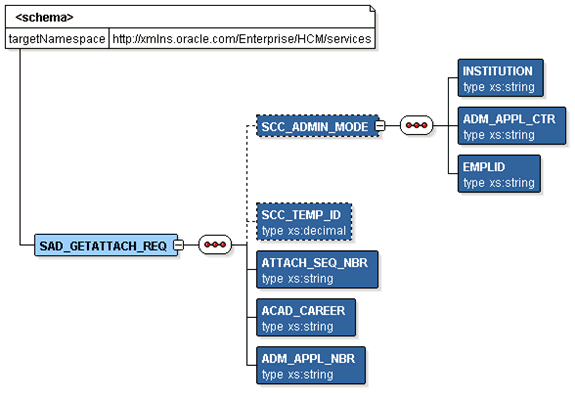
Required data that the online application must supply to the service operation in Non-administrator (Applicant) mode:
-
Attachment Sequence Number
-
Academic Career
-
Application Number
Required data that the online application must supply to the service operation in Administrator mode:
-
Institution
-
Admission Application Center
The following is an example of the SAD_GETATTACH_REQ message that the SAD_GETATTACH service operation receives from an online application:
<?xml version="1.0"?>
<SAD_GETATTACH_REQ>
  <ACAD_CAREER>UGRD</ACAD_CAREER>
  <ADM_APPL_NBR>00024501</ADM_APPL_NBR>
  <ATTACH_SEQ_NBR>1</ATTACH_SEQ_NBR>
</SAD_GETATTACH_REQ>
Output Message: SAD_GETATTACH_RESP
When the Integration Broker receives the SAD_GETATTACH_REQ message, it responds with the SAD_GETATTACH_RESP message.
This image shows the output parameter that the SAD_GETATTACH service operation passes to the online application.
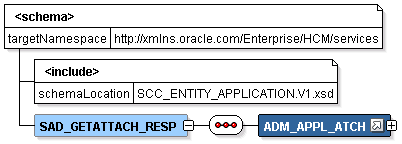
The following is an example of the SAD_GETATTACH_RESP message that the SAD_GETATTACH service operation transmits to the online application:
<?xml version="1.0"?>
<SAD_GETATTACH_RESP>
  <ADM_APPL_ATCH class="R">
    <EMPLID>2</EMPLID>
    <ACAD_CAREER>UGRD</ACAD_CAREER>
    <STDNT_CAR_NBR>0</STDNT_CAR_NBR>
    <ADM_APPL_NBR>00024501</ADM_APPL_NBR>
    <ATTACH_SEQ_NBR>1</ATTACH_SEQ_NBR>
    <DESCR254>test file</DESCR254>
    <SCC_ROW_ADD_OPRID/>
    <SCC_ROW_ADD_DTTM/>
    <SCC_ROW_UPD_OPRID/>
    <SCC_ROW_UPD_DTTM/>
    <ATTACHSYSFILENAME>ADM_APPL_ATCH_20090331161239_Who Columns.doc</ATTACHSYSFILENAME>
    <ATTACHUSERFILE>Who Columns.doc</ATTACHUSERFILE>
    <AV_ATCH_TYPE/>
<BASE64FILE>0M8R4KGxGuEAAAAAAAAAAAAAAAAAAAAAPgADAP7/CQAGAAAAAAAAA  </BASE64FILE>
  </ADM_APPL_ATCH>
  <CONSTITUENT>
   <!-- Constituent data shape -->
  </CONSTITUENT>
</SAD_GETATTACH_RESP>
Fault Message: SAD_FAULT_RESP
Refer to the SAD_FAULT_RESP message example in the SAD_CREATEAPPL section.