SAD_SUBMITAPPL
This service operation enables the user to submit a completed admissions application to the Campus Solutions system. The service operation initially saves the applications to the admissions staging tables and subsequently posts the staged application data to the admissions production tables.
| Submit Application Service Operation Description and Features | Details |
|---|---|
|
Description |
The Submit Application service call results in the given admissions application being submitted to the Campus Solutions system. The application must be complete (according to the institution's data capture requirements). The online application user interface and the underlying Campus Solutions data model ensure that the submitted admission application is complete. The application submit process involves first validating the data, then saving the data to the admissions staging tables, and finally transferring the staged data into the admissions production tables. When initially saving the application to the staging tables, if the application does not have an application number, the service operation assigns an application number (ADM_APPL_NBR) to the application for tracking purpose. The operation does not assign an application number if another operation (for example, the SAD_SAVEAPPL operation) has already assigned an application number. The admission application must pass through validation checks before it gets submitted. The service operation validates all aspects of application data including data entered and translate values selected by the user on the online application and custom business validation rules that the institution has incorporated into the online application. If the constituent who initiated the application submit process is known to the Campus Solutions system (for example, the constituent has an EMPLID), then the constituent and application data is eligible to be posted to the admissions and person production tables. Otherwise, the application remains in the staging tables until addressed by an administrator. When configured to do so, the constituent can pay an application fee and/or request an application fee waiver. Applications may include attachments. The online application must encode the attachment in Base64 format before passing the attachment to Campus Solutions. |
|
Users |
|
|
Processing |
This service operation performs the following steps:
|
|
Output |
After completing the processing steps, the service operation:
|
|
Error Conditions |
The following conditions result in a service error:
|
Input Message: SAD_SUBMITAPPL_REQ
This image shows the input parameters that the SAD_SUBMITAPPL service operation receives from an online application.
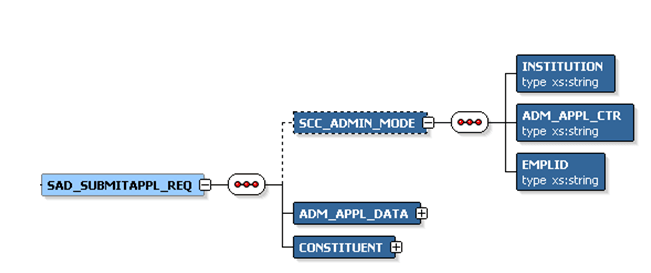
Note that the SAD_SUBMITAPPL_REQ schema includes the Application entity (ADM_APPL_DATA) and Constituent entity XSD schemas.
Required data that the online application must supply to the service operation in Non-administrator (Applicant) mode:
-
ADM_APPL_DATA
-
CONSTITUENT
Required data that the online application must supply to the service operation in Administrator mode:
-
Institution
-
Admission Application Center
-
ADM_APPL_DATA
-
CONSTITUENT
The following is an example of the SAD_SUBMITAPPL_REQ message that the SAD_SUBMITAPPL service operation receives from an online application:
<?xml version="1.0"?>
<SAD_SUBMITAPPL_REQ>
  <ADM_APPL_DATA>
   <!-- Application data shape -->
  </ADM_APPL_DATA>
  <CONSTITUENT>
   <!-- Constituent data shape -->
  </CONSTITUENT>
</SAD_SUBMITAPPL_REQ>
Output Message: SAD_SUBMITAPPL_RESP
When the Integration Broker receives the SAD_SUBMITAPPL_REQ message, it responds with the SAD_SUBMITAPPL_RESP message.
This image shows the output parameters that the SAD_SUBMITAPPL service operation passes to the online application.
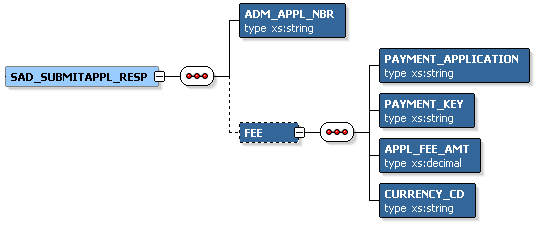
The following is an example of the SAD_SUBMITAPPL_RESP message that the SAD_SUBMITAPPL service operation transmits to the online application:
<?xml version="1.0"?>
<SAD_SUBMITAPPL_RESP>
  <ADM_APPL_NBR>00023456</ADM_APPL_NBR>
  <FEE>
    <PAYMENT_APPLICATION>SADAAWS</PAYMENT_APPLICATION>
    <PAYMENT_KEY>00023456</PAYMENT_KEY>
    <APPL_FEE_AMT>20</APPL_FEE_AMT>
    <CURRENCY_CD>USD</CURRENCY_CD>
  </FEE>
</SAD_SUBMITAPPL_RESP>
Fault Message: SAD_FAULT_RESP
Refer to the SAD_FAULT_RESP message example in the SAD_CREATEAPPL section.