SSF_COMPLETE_EPAYMENT
This web service operation completes a previously initiated (SSF_INITIATE_EPAYMENT) SF Payment, by authorizing the transaction and submitting the application. If authorization is successful, the SF Payment Transaction Manager will create the Direct GL Transaction.
After having successfully invoked the SSF_INITIATE_EPAYMENT service operation, the Online Application should transition the applicant to the third party payment provider using the SCC_HTML_STRING returned from the SSF_INITIATE_EPAYMENT response. This next web service should be invoked after the transaction is submitted by the applicant from the third party payment processor user interface.
Details:
|
Description: |
The Complete ePayment web service operation interprets the response from the third party payment processor by invoking the hosted payment framework. The data received from the third party is transformed into Campus Solutions data elements to allow the update of both Student Financials tables and the calling Payment Application (AAWS). If the user submitted the transaction successfully from the third party processor, this web service operation will complete any processing required in Student Financials to record the payment. The session ID, which is a unique token generated and returned by the third party to identify the payment, as well as the last 4 digits of the credit card or account number, will be stored in the SF Payment table from within the hosted payment framework. The ePayment API will be invoked to authorize the transaction. If successful, the payment will be processed in Student Financials by setting the SF Payment status to Complete (SF_PAYMENT_STATUS = B), creating the SF Payment Log with the results of the authorization, and eventually deleting the SF Payment. The transaction will be recorded directly in the General Ledger using the Direct to GL API (as opposed to posting to a Student Financials account). Finally, the adapter for AAWS will be invoked to submit the application. The application fee status will be set to Received, the Application Fee Paid amount and GL Sent Amount will be set to the Payment Amount. The Admissions Application Tender Staging record’s tender amount will also be set to the Payment Amount. If the user cancelled the transaction from the third party payment processor’s hosted site, the SF Payment status will be set to Cancelled. No update will occur on the AAWS adapter and the applicant can submit another payment against the application. |
|
Users: |
An applicant using an online application. |
|
Processing: |
This service operation performs the following steps:
|
|
Output: |
After completing the processing steps, the service operation:
|
|
Error Conditions: |
The following conditions result in a service error:
|
Input Message: SSF_COMPLETE_EPAYMENT_REQ
This image shows the input parameters that the SSF_COMPLETE_EPAYMENT service operation receives from an online application.
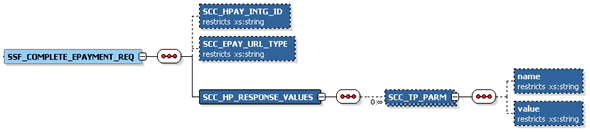
Required data that the online application must supply to the service operation:
-
Hosted Payment Adapter ID.
-
Return URL Type (Success, Cancelled, Error).
-
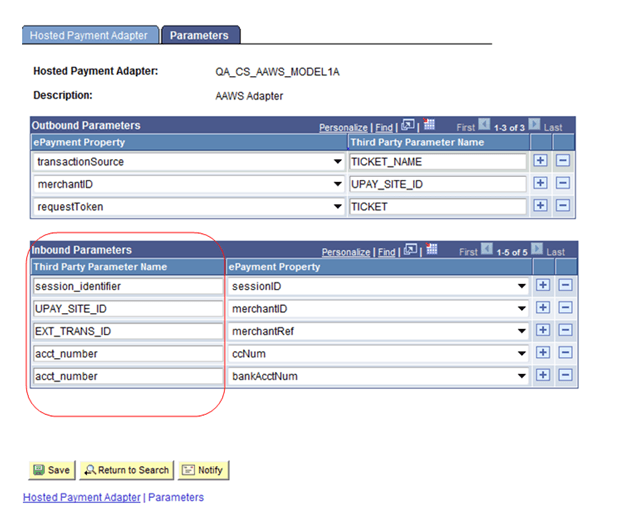
Hosted Payment Response Values (Name/Value pairs returned from third party). These values are expected to correspond to the values under the Third Party Parameter Name of Inbound Parameters grid of Hosted Payment Adapter Setting. For example:
This example illustrates a Hosted Payment Adapter setting.
The following is an example of the SSF_COMPLETE_EPAYMENT_REQ message that the SSF_COMPLETE_EPAYMENT service operation receives from an online application:
<?xml version="1.0"?>
<SSF_COMPLETE_EPAYMENT_REQ xmlns="http://xmlns.oracle.com/Enterprise/HCM/services">
  <SCC_HPAY_INTG_ID>QA_CS_AAWS_MODEL1A</SCC_HPAY_INTG_ID>
  <SCC_EPAY_URL_TYPE>S</SCC_EPAY_URL_TYPE>
  <SCC_HP_RESPONSE_VALUES>
    <SCC_TP_PARM>
      <name>session_identifier</name>
      <value>5c012fb4-43a4-4ffd-be63-a1415ce2b7e4</value>
    </SCC_TP_PARM>
    <SCC_TP_PARM>
      <name>UPAY_SITE_ID</name>
      <value>12</value>
    </SCC_TP_PARM>
    <SCC_TP_PARM>
      <name>EXT_TRANS_ID</name>
      <value>SADAAWS_00024863</value>
    </SCC_TP_PARM>
    <SCC_TP_PARM>
      <name>acct_number</name>
      <value>XXXXXXXXX2222</value>
    </SCC_TP_PARM>
    <SCC_TP_PARM>
      <name>acct_number</name>
      <value>XXXXXXXXX2222</value>
    </SCC_TP_PARM>
  </SCC_HP_RESPONSE_VALUES>
</SSF_COMPLETE_EPAYMENT_REQ>
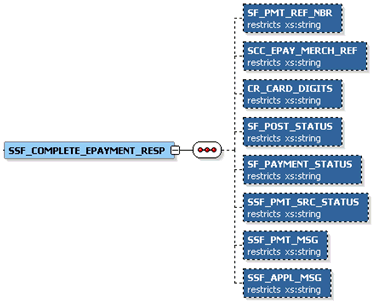
Output Message: SSF_COMPLETE_EPAYMENT_RESP
When the Integration Broker receives the SSF_COMPLETE_EPAYMENT_REQ message, it responds with the SSF_COMPLETE_EPAYMENT_RESP message.
This image shows the output parameters that the SSF_COMPLETE_EPAYMENT service operation passes to the online application.
The following is an example of the SSF_COMPLETE_EPAYMENT_RESP message that the SSF_COMPLETE_EPAYMENT service operation transmits to the online application:
<?xml version="1.0"?>
<SSF_COMPLETE_EPAYMENT_RESP xmlns="http://xmlns.oracle.com/Enterprise/HCM/services">
  <SF_PMT_REF_NBR>000000000043</SF_PMT_REF_NBR>
  <SCC_EPAY_MERCH_REF>00024828</SCC_EPAY_MERCH_REF>
  <CR_CARD_DIGITS>1111</CR_CARD_DIGITS>
  <SF_POST_STATUS>S</SF_POST_STATUS>
  <SF_PAYMENT_STATUS>B</SF_PAYMENT_STATUS>
  <SSF_PMT_SOURCE_STATUS>S</SSF_PMT_SOURCE_STATUS>
  <SSF_PMT_MSG>Your payment was successfully processed.</SSF_PMT_MSG>
  <SSF_APPL_MSG>Your application 00024828 was successfully submitted.</SSF_APPL_MSG>
</SSF_COMPLETE_EPAYMENT_RESP>
Fault Message: SSF_TRANS_FAULT_RESP
Refer to the SSF_TRANS_FAULT_RESP message example in the SSF_INITIATE_EPAYMENT section.