SSF_INITIATE_EPAYMENT
This service operation enables the user to record a newly initiated electronic payment in Student Financials and provides access to Campus Solutions’ hosted payment framework. The hosted payment framework provides information necessary to transition the user to a designated third party payment provider’s hosted site to make a payment. The insert into the GL_TXN table, for the general ledger process, will not be done until the Complete ePayment service operation (SSF_COMPLETE_EPAYMENT) is invoked successfully.
This web service operation is adapter-based. AAWS has been delivered with its own custom Payment Application adapter and will perform its own validation according to the admissions application functional requirements.
Note that the Initiate ePayment service operation operates only within the Self Service mode (and cannot be used within the Administrator mode).
Details:
|
Description: |
The Initiate ePayment service operation call will create a new SF Payment in Student Financials in Initiated status, assigning a new SF Payment Reference Number (SF_PMT_REF_NBR) for tracking. This service uses the payment application’s own tracking number as the merchant reference number passed to the third party payment processor. For AAWS, that tracking number is the application number (ADM_APPL_NBR). The application number will be stored in the SF Payment as ADM_APPL_NBR and SSF_EXT_TRANS_REF and the SF Payment Reference number will be stored in the Admissions Tender Staging table. In addition, the Temp ID will be stored in the SF Payment and Log. The service, through the AAWS adapter, will create new Admissions Tender Staging records (if they do not exist) for all tenders associated with the application center used in the creation of the application. The Initiate ePayment service will perform initial validation. For instance, the payment method must be either credit card or electronic check (CC or EC), the amount has to be greater than zero, and the Payment Application must be defined in the system table SSF_ELEC_PMTS. When the AAWS adapter is invoked, it will perform further validation on the transaction.
|
|
Users: |
An applicant using an online application. |
|
Processing: |
This service operation performs the following steps:
|
|
Output: |
After completing the processing steps, the service operation:
|
|
Error Conditions: |
The following conditions result in a service error:
|
Input Message: SSF_INITIATE_EPAYMENT_REQ
This image shows the input parameters that the SSF_INITIATE_EPAYMENT service operation receives from an online application.
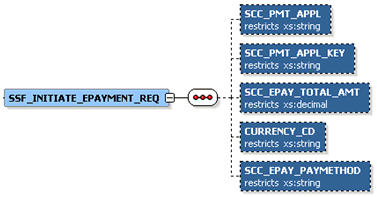
Required data that the online application must supply to the service operation:
-
Payment Application
-
Payment Application Key (Application Number)
-
Payment Amount
-
Currency Code
-
Payment Method (Credit card or electronic check)
The following is an example of the SSF_INITIATE_EPAYMENT_REQ message that the SSF_INITIATE_EPAYMENT service operation receives from an online application:
<?xml version="1.0"?>
<SSF_INITIATE_EPAYMENT_REQ xmlns="http://xmlns.oracle.com/Enterprise/HCM/services">
  <SCC_PMT_APPL>SADAAWS</SCC_PMT_APPL>
  <SCC_PMT_APPL_KEY>00024828</SCC_PMT_APPL_KEY>
  <SCC_EPAY_TOTAL_AMT>20</SCC_EPAY_TOTAL_AMT>
  <CURRENCY_CD>USD</CURRENCY_CD>
  <SCC_EPAY_PAYMETHOD>CC</SCC_EPAY_PAYMETHOD>
</SSF_INITIATE_EPAYMENT_REQ>
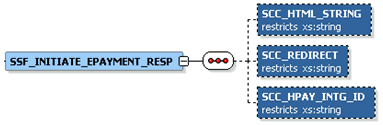
Output Message: SSF_INITIATE_EPAYMENT_RESP
When the Integration Broker receives the SSF_INITIATE_EPAYMENT_REQ message, it responds with the SSF_INITIATE_EPAYMENT_RESP message.
This image shows the output parameters that the SSF_INITIATE_EPAYMENT service operation passes to the online application.
The following is an example of the SSF_INITIATE_EPAYMENT_RESP message that the SSF_INITIATE_EPAYMENT service operation transmits to the online application:
<?xml version="1.0"?>
<SSF_INITIATE_EPAYMENT_RESP xmlns="http://xmlns.oracle.com/Enterprise/HCM/services">
  <SCC_REDIRECT>N</SCC_REDIRECT>
  <SCC_HTML_STRING>
    <![CDATA*<SCRIPT LANGUAGE='JavaScript'>
writeConsole('https://someserver/C30002test_upay/web/index.jsp', '<input type="HIDDEN" name="TICKET_NAME" value="SADAAWS"><input type="HIDDEN" name="UPAY_SITE_ID" value="12"><input type="HIDDEN" name="TICKET" value="ce224625-e55c-4346-b87c-96f784f5ae90">');
function writeConsole(bind1, bind2)
{
var stuff = '<form name="payform" action="'+bind1+
'" method="POST">'+bind2+'<SCRIPT LANGUAGE="JavaScript" onload="submitForm()">'+
'function submitForm(){document.payform.submit()}'+
'</'+'SCRIPT>'+'</'+'form'+'>';
document.body.innerHTML = stuff;
document.payform.submit();
}
</SCRIPT>*]>
  </SCC_HTML_STRING>
  <SCC_HPAY_INTG_ID>QA_CS_AAWS_MODEL1A</SCC_HPAY_INTG_ID>
</SSF_INITIATE_EPAYMENT_RESP>
Fault Message: SSF_TRANS_FAULT_RESP
If the service operation encounters an error condition, it responds with the SSF_TRANS_FAULT_RESP message.
The following is an example of the SSF_TRANS_FAULT_RESP message that the SSF_INITIATE_EPAYMENT service operation transmits to the online application:
<?xml version="1.0"?>
<SOAP-ENV:Envelope xmlns:SOAP-ENC="http://schemas.xmlsoap.org/soap/encoding/" xmlns:SOAP-ENV="http://schemas.xmlsoap.org/soap/envelope/">
  <SOAP-ENV:Body>
    <SOAP-ENV:Fault>
      <faultcode>Client</faultcode>
      <faultstring>An Error occurred processing this request (14098,286)</faultstring>
      <detail>
        <MSGS>
          <MSG>
            <ID>14871-11</ID>
            <DESCR>The Payment Amount must be greater than zero. (14871,11)</DESCR>
          </MSG>
        </MSGS>
      </detail>
    </SOAP-ENV:Fault>
  </SOAP-ENV:Body>
</SOAP-ENV:Envelope>