Setting Up Accounting Dates
This section discusses how to set up accounting dates.
Page Used to Set Up Accounting Dates
| Page Name | Definition Name | Navigation | Usage |
|---|---|---|---|
|
Accounting Dates |
SSF_ACCTG_DT_DEFN |
|
Set up accounting dates for a term or a combination of term and session. |
Setting Up Accounting Dates for Terms or Sessions
Access the Accounting Dates page ().
This example illustrates the fields and controls on the Accounting Dates page. You can find definitions for the fields and controls later on this page.
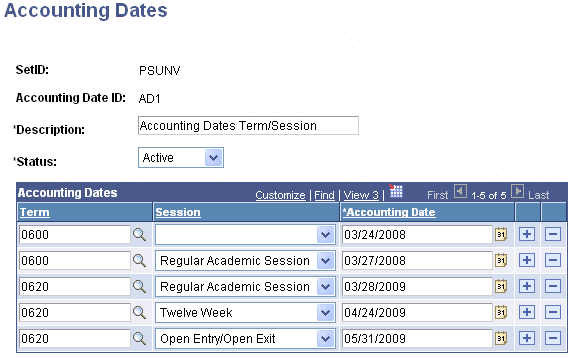
Use this page to maintain accounting date IDs and accounting dates for each term or combination of term and session.
All IDs that you set up on this page and that have an active status are available in the Accounting Date ID field on the Initial Setup page. On that page you can assign an ID to an item type to designate the specific date to be used for transactions.
See Setting Up Item Types and Item Type Groups.
| Field or Control | Description |
|---|---|
|
Accounting Date |
Enter a date to be used to stamp Accounting Date (ACCOUNTING_DT) in Accounting Line (SF_ACCTG_LN) transactions. You can set up an accounting date for a term or a combination of term and session. |