Class Enrollment Processing
The class enrollment processing tools in Student Records provides maximum flexibility when dealing with enrollment transactions and other enrollment-related activities. Five components and one self-service application, all of which post enrollment records to the same table (STDNT_ENRL), are available for you to process enrollment transactions.
You can process enrollment requests on a student-by-student basis through the Quick Enroll and Enrollment Request components. You can process enrollment requests for blocks of students and classes through the Block Enrollment component. Through the Mass Enrollment component, you can post a range of enrollment requests. Enrollment requests from all of these components go through the powerful enrollment engine during the posting process. The enrollment engine verifies that for every class requested, the student meets all rules for requisites, deadlines, permissions, and so on. Optionally, the enrollment engine also warns of potential repeats.
The Enrollment component, in contrast, bypasses the enrollment engine and all of its checkpoints, posting enrollment transactions directly to a student's enrollment record as soon as you save the data in the component. The Enrollment component is intended for use by only a select few power users at your academic institution and should not be made available to a wide user population.
If your academic institution has licensed Campus Self Service, your students can also submit enrollment requests over the internet during their scheduled enrollment appointment times. These requests function the same as all other enrollment requests in your Student Administration system, writing data directly to your application tables.
When a user submits an enrollment request for an open entry/exit (OEE) class, the enrollment engine evaluates the student's primary academic program to verify that the academic program permits OEE enrollment. If the academic program does not permit OEE enrollment, the system returns an error message notifying the user that enrollment is not allowed in the chosen class. If the academic program does permit OEE enrollment, the enrollment engine then performs all of the existing edits as usual (such as class limits and requisite checks).
If the request successfully passes these edits, the enrollment process uses the OEE dynamic date rule assigned to the class to calculate a class end date and all the other dynamic calendar dates for the student. If no OEE dynamic date rule has been defined for the class, the enrollment process uses the rule established for the course offering. If no rule exists for the course offering, the request fails and the process returns an error message.
If the request is successful, you can view the dates calculated by the process using the academic calendar link on the Study List or by accessing the Student OEE Enroll Data page.
To submit an enrollment transaction for a student, the student must have a personal data record, have been activated in an academic program within the academic career to which the classes belong, and have been activated in the necessary term for that same academic career.
Diagram of Enrollment Engine Logic
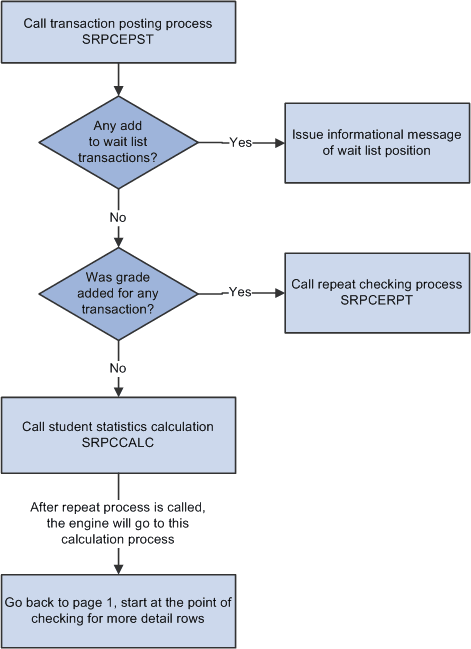
The following diagrams show a high-level process flow of the enrollment engine:
Diagram 1 of 3 showing enrollment engine logic:
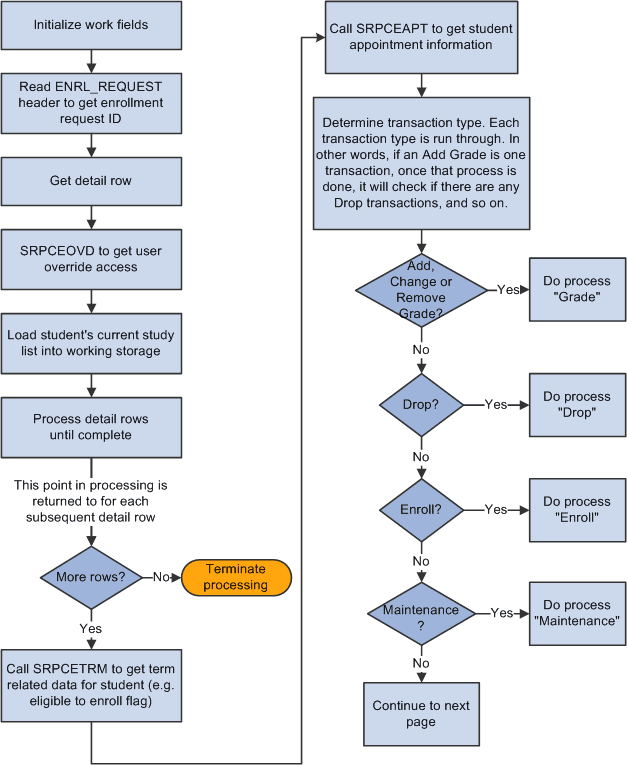
Diagram 2 of 3 showing enrollment engine logic:
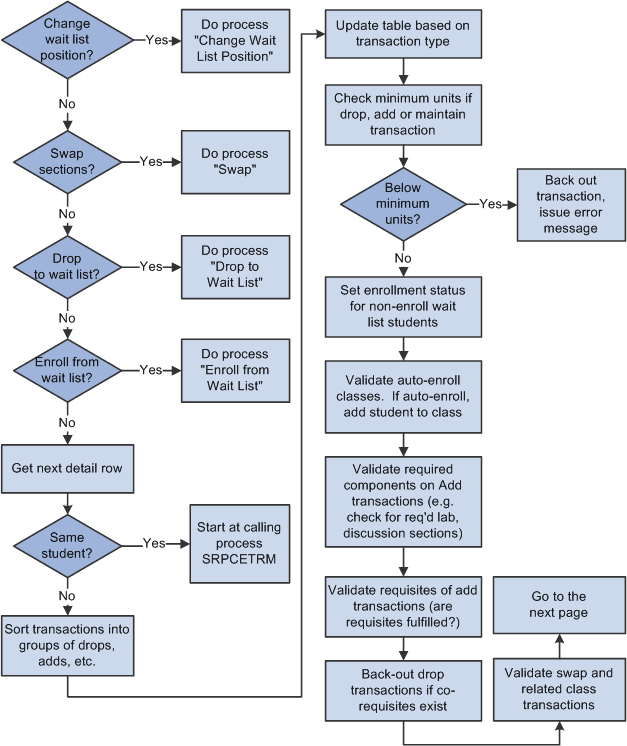
Diagram 3 of 3 showing enrollment engine logic: