Preparing for SDR Reporting
This section discusses how to:
-
Define funding categories.
-
Define course classifications.
-
Define MoE subject codes.
-
Set up field of study codes.
Pages Used to Prepare for SDR Reporting
| Page Name | Definition Name | Navigation | Usage |
|---|---|---|---|
|
Funding Category NZL |
SSR_FUND_CAT_NZL |
|
Define funding category codes and their amounts. |
|
Course Classification NZL |
SSR_CRS_CLSF_FNDC |
|
Define course and program classifications and associate them with funding categories. |
|
MoE Subject NZL |
SSR_MOE_SUBJECT |
|
Define MoE subject codes. |
|
NZSCED Field of Study |
SSR_NZSCED_BRD |
|
Set up the NZSCED (New Zealand Standard Classification of Education) field of study codes by defining the broad, narrow, and detail codes that you attach to courses for use in SDR Course and Course Register files. |
Defining Funding Categories
Access the Funding Category NZL page ().
This example illustrates the fields and controls on the Funding Category NZL page. You can find definitions for the fields and controls later on this page.
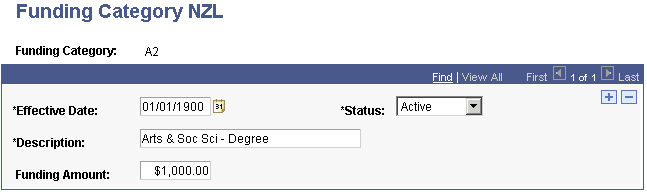
| Field or Control | Description |
|---|---|
|
Funding Category |
When setting up your funding categories, enter the two-digit alphanumeric code for the funding category. The first digit is the academic category (A-Z) and the second digit is the degree status (1-5). The degree status variations are:
|
|
Funding Amount |
Enter the MoE funding amount for this funding category. |
Defining Course Classifications
Access the Course Classification NZL page ().
This example illustrates the fields and controls on the Course Classification NZL page. You can find definitions for the fields and controls later on this page.
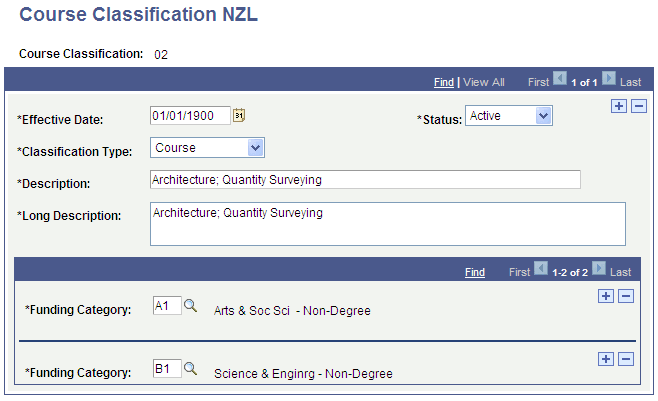
| Field or Control | Description |
|---|---|
|
Course Classification |
When setting up your classification codes, enter the MoE course classification code. |
|
Classification Type |
Select Course or Programme. |
|
Funding Category |
Enter the funding category for this course classification. You can enter as many funding categories as needed for each classification. Note: You must assign at least one funding category to each course classification. |
Defining MoE Subject Codes
Access the MoE Subject NZL page ().
Link these subject codes to your institution's plan offerings on the Academic Plan page.
See Campus Solutions Application Fundamentals: (NZL) Setting Up New Zealand Academic Plans.
Setting Up Field of Study Codes
Access the NZSCED Field of Study page ().
Important:
The NZSCED broad, narrow, and detail codes are defined by the MoE.
This example illustrates the fields and controls on the NZSCED Field of Study page. You can find definitions for the fields and controls later on this page.
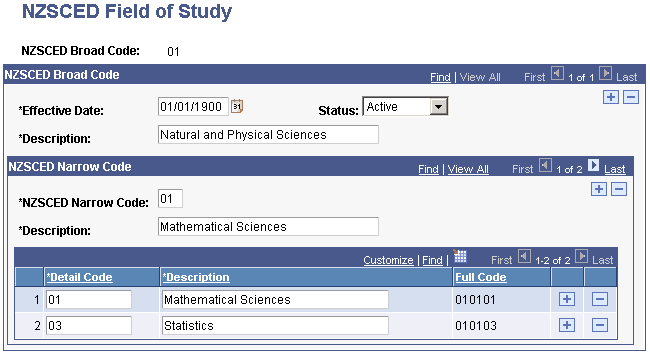
| Field or Control | Description |
|---|---|
|
NZSCED Broad Code |
When setting up the field of study codes, enter the NZSCED broad code for this field of study. |
|
NZSCED Narrow Code |
Enter the NZSCED narrow codes for the broad code. Insert rows to enter all of the narrow codes for this broad code. |
|
Detail Code |
Enter the NZSCED detail codes for the narrow code. Insert rows in the grid to enter all of the detail codes for this narrow code. |
Note:
You attach the combination of broad, narrow, and detail code to a course at the catalog level. For example, the code 010103 is the NZSCED code for Statistics.
Related Topics