Setting Up APT Reason Codes

Your institution can use the APT Reason Code Table page to set up reason codes to be used in the Academic Item Attempt Results section of the APT Items page. For example, a student may be granted a higher result and compensation due to ill-health or other mitigating circumstances; a result may be excluded due to plagiarism. You can set up reasons to be added to a specific result. A reason code can be stored for each result row in the APT Items page if required. You can also add the reason code when you enter results on the APT Administrative Roster page.
See Managing APT Items

See Managing the APT Administrative Roster

Page Used to Set Up APT Reason Codes

Page Name Definition Name Navigation Usage

APT Reason Code Table

SSR_APT_RSN_TBL

Set Up SACR, and then Product Related, and then Student Records, and then Program Enrollment, and then APT Reason Code Table

Set up reason codes for Academic Item Attempt Results.

Defining APT Reason Codes

Access the APT Reason Code Table page (Set Up SACR, and then Product Related, and then Student Records, and then Program Enrollment, and then APT Reason Code Table).

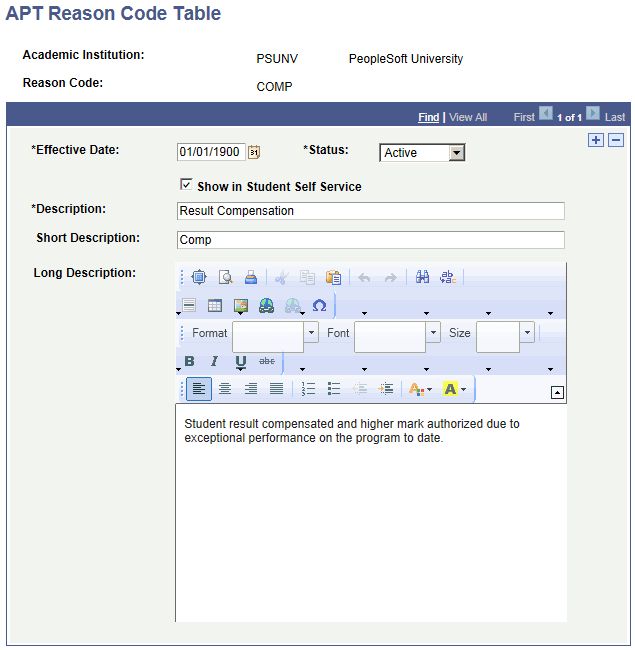
This example illustrates the fields and controls on the APT Reason Code Table page.

APT (Academic Progress Tracker) Reason Code Table page
Field or Control Description

Show in Student Self Service

Planned for the future.