Viewing and Adjusting Evaluation Results
When the evaluation process is run, the system populates the Adjust Evaluation Results component (SSR_STPRGTR_CR_NLD). Evaluation results can be corrected or changed in this component if necessary.
This section discusses how to:
-
View additional details of student evaluation results.
-
Approve adjustments.
-
Adjust evaluation results.
Pages Used to View and Adjust Evaluation Results
| Page Name | Definition Name | Navigation | Usage |
|---|---|---|---|
|
Result Determination |
SSR_STPRG_APPR_NLD |
|
View student evaluation results. |
|
Details Determination |
SSR_STDPRAPTST_NLD |
|
View additional details of student evaluation results. |
|
Adjust Approval |
SSR_STPRGAPCR_NLD |
|
Manually override the outcome of the evaluation process. |
|
Adjust Result |
SSR_STDPRAPTCR_NLD |
|
Indicate whether a correction needs to be made to a requisite line. |
Viewing Additional Details of Student Evaluation Results
Access the Details Determination page ().
| Field or Control | Description |
|---|---|
|
Test ID HigLvl (Test ID Higher Level) |
Displays the higher level test ID if the lower level test ID has been substituted. |
|
Education Level |
Displays the education level from the HEGIS code linked to the test ID in the Test Catalog. |
Approving Adjustments
Access the Adjust Approval page ().
| Field or Control | Description |
|---|---|
|
Requisite ID |
The requisite ID for which the student has been evaluated. Requisites are defined on the Requisites table. |
|
Approval Result |
If necessary, change the result to either Passed or Not Passed. |
|
Result Date |
The system populates this field with the date on which the Evaluation process is run. |
Adjusting Evaluation Results
Access the Adjust Result page ().
This example illustrates the fields and controls on the Adjust Result page. You can find definitions for the fields and controls later on this page.
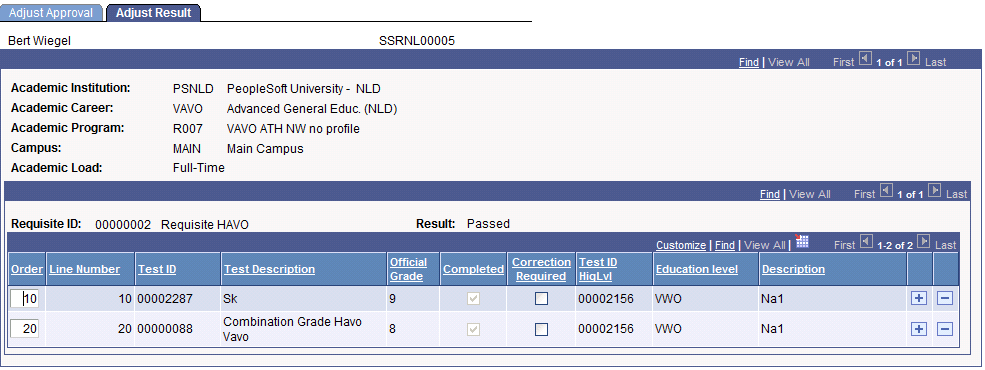
| Field or Control | Description |
|---|---|
|
Order |
Enter the requisite line number. |
|
Correction Required |
Select if the test ID, official grade, or test ID higher level on this line can be replaced by another test ID. |