Calculating Grades and Evaluating Students
After all grades for tests have been entered, the system can calculate the results by student or by program. The calculation process uses a test tree to retrieve test grades, weight values, and attributes.
Evaluations are also run by student or program. Based on information in the Requisite table, the system determines whether the student has passed or not passed. All of the requisites that are linked to the student's assigned test tree are evaluated, and the results per requisite and per requisite line are written to the Results table.
This section provides an overview of the Calculation process and discusses how to:
-
Calculate grades per student.
-
Calculate grades per program.
-
Evaluate results per student.
-
Evaluate results per program.
Understanding the Calculation Process
The calculation process:
-
Selects students for whom to calculate grades.
-
Determines whether the student is active in a program.
-
Selects the test tree that is linked to the student and determines whether the tree is valid.
-
Starts the actual calculation process starting with the nodes at the lowest level of the test tree.
-
For each node on the test tree, selects the underlying tests and calculated results.
-
For each node, selects the information from the calculated results with the latest effective date.
-
Determines whether the calculated results already exist for the student. If the calculated result already exists, and calculate within term only is not selected, the existing calculated result is deleted.
-
Writes the results to the Results table.
Pages Used to Calculate Cumulative Grades and Evaluate Students
| Page Name | Definition Name | Navigation | Usage |
|---|---|---|---|
|
Cumulative Grades per Student |
SSR_RUNTSTEMPL_NLD |
|
Start the Cumulative Grades per Student SQR process (SRCEMPNL) for specific students. |
|
Cumulative Grades per Program |
SSR_RUN_CALTST_NLD |
|
Start the Cumulative Grades per Program SQR process (SRCACDNL) for all students in an academic program. |
|
Evaluation per Student |
SSR_RUNTSTEMPL_NLD |
|
Start the Student Evaluation SQR process (SREVANENL) for specific students. |
|
Evaluation per Program |
SSR_RUN_CALTST_NLD |
|
Start the Program Evaluation SQR process (SREVAPNL) for all students in an academic program. |
Calculating Grades per Student
Access the Cumulative Grades per Student page ().
This example illustrates the fields and controls on the Cumulative Grades per Student page. You can find definitions for the fields and controls later on this page.
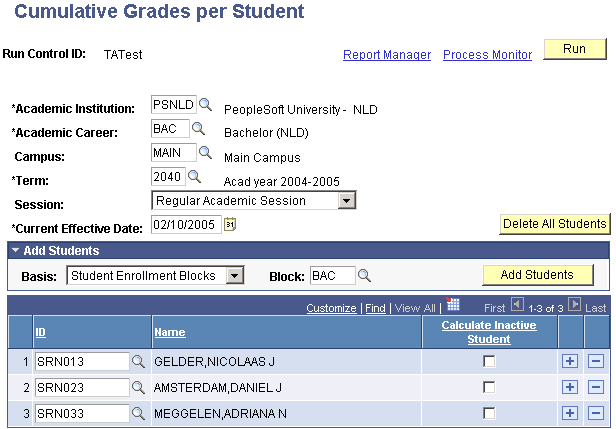
| Field or Control | Description |
|---|---|
|
Basis |
Select how the system selects students for the calculation process. The values are Enrollment in Classes, Student Enrollment Blocks, and Student Groups. |
|
Block, Class, and Group |
Enter the enrollment block, class, or student group for the system to calculate grades. |
|
Calculate Inactive Student |
Select to have the system consider grades for students who are no longer active in the academic career in the calculation process. |
Calculating Grades per Program
Access the Cumulative Grades per Program page ().
| Field or Control | Description |
|---|---|
|
Academic Program |
Enter the academic program for the system to calculate grades. |
Evaluating Results per Student
Access the Evaluation per Student page ().
| Field or Control | Description |
|---|---|
|
Delete All Students |
Click to clear all student rows from this page. |
|
Basis |
Select how the system selects students for the evaluation process. The values are Enrollment in Classes, Student Enrollment Blocks, and Student Groups. |
|
Block, Class, and Group |
Enter the enrollment block, class, or student group for the system to run the evaluation process. |
|
Add Students |
Click to have the system list the students from the selected basis on this page. |