Adding the New ChartField Prompt Edit Views
Use the ChartField Security Edit Tables page to add the new ChartField prompt edit views to the Chartfield Security Edit Tables component.
Navigation:
.
These views are used by the prompt edit list in the transaction online pages that support ChartField Security.
This example illustrates the fields and controls on the ChartField Security Edit Tables - Edit Tables. You can find definitions for the fields and controls later on this page.
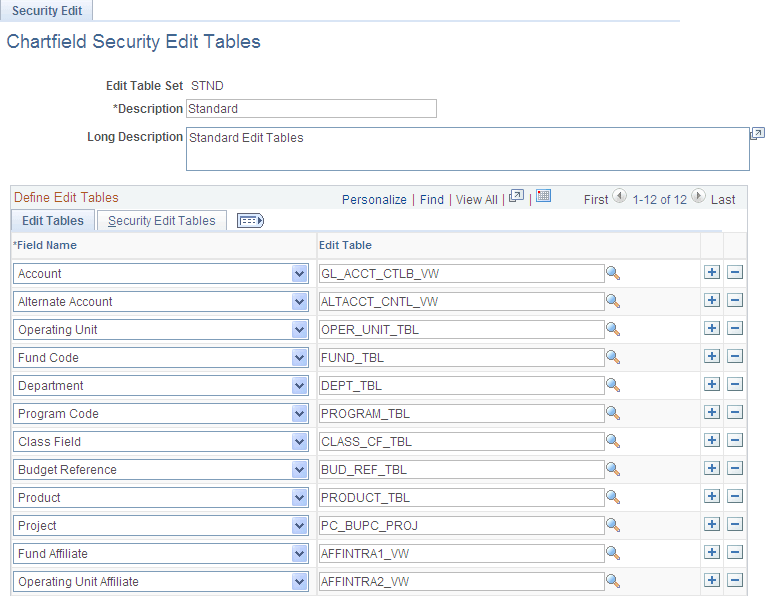
Select the new ChartField, associated edit table and security edit tables from this component (SEC_EDIT_TBLS). Modify both delivered Edit Table Sets for Standard (STND) and GL Business Unit (BUGL).
Edit Tables
| Field or Control | Description |
|---|---|
|
Field Name |
Select the new ChartField from the prompt list. |
|
Edit Table |
Select the ChartField table from the prompt list. |
Security Edit Tables
Select the ChartField Security views for the user, role and permission list. These views are created by the ChartField Configuration process.
| Field or Control | Description |
|---|---|
|
Field Name |
Displays the new ChartField that you selected from the Edit Tables tab. |
|
User ID Security View |
Select the user ChartField Security view. This view is cloned from SEC_OU_UVW. |
|
Role Security View |
Select the role ChartField Security view. This view is cloned from SEC_OU_RVW. |
|
Permission List Security View |
Select the permission list ChartField Security view. This view is cloned from SEC_OU_PVW. |