Application Class Registry Page
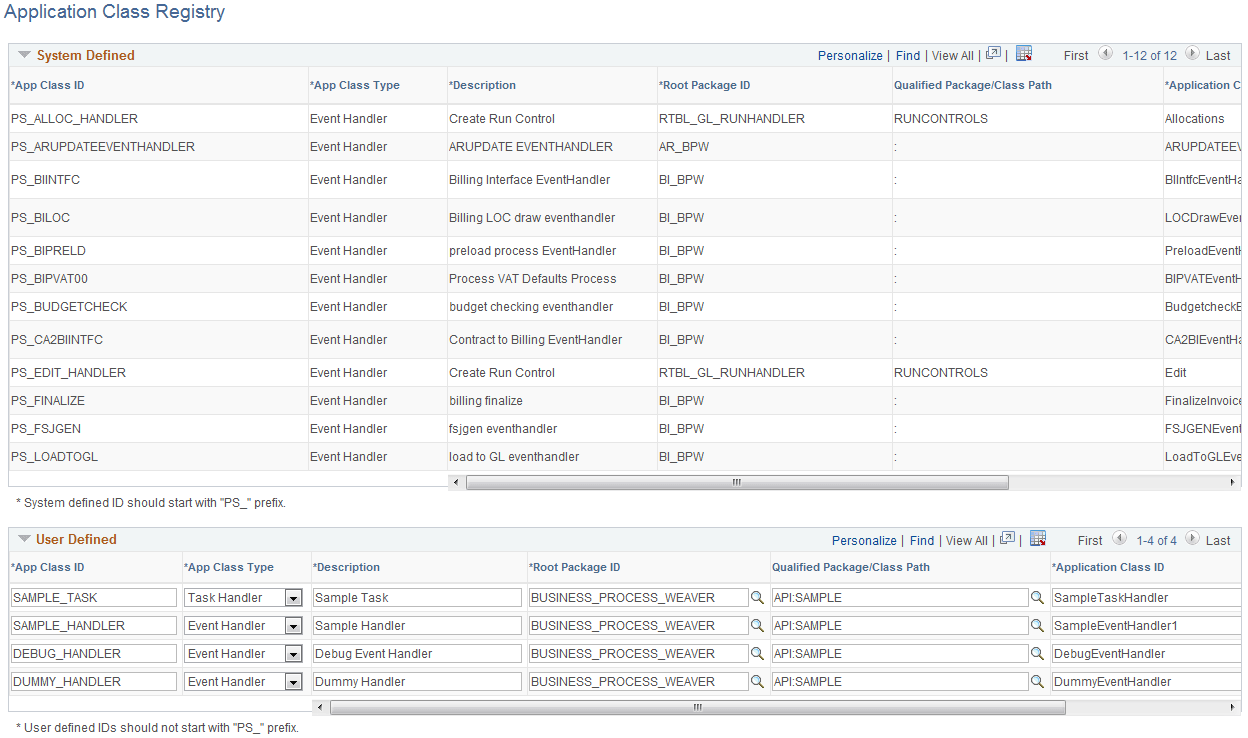
Use the Application Class Registry page (BPW_APPCLS_TBL) to register Application Classes that will be used in business processes. Any Event Handler or Task Handler used in a business process should be registered on this page.
Navigation:
This example illustrates the fields and controls on the Business Process Weaver - Application Class Registry page. You can find definitions for the fields and controls later on this page.
Note:
This page is intended for application developer use.
The purpose of this registry is to assign a single ID to the application class so that a user does not need to know the full path to the application class in order to specify it in the Business Process Definition. It also provides the flexibility to switch the application class that is used without changing the Business Process Definition, run control, or instance.
System Defined
The System Defined data is display-only. PeopleSoft delivers App Class IDs that are used by PeopleSoft applications.
User Defined
You can add your own application classes within the User Defined group box. The App Class ID must not start with “PS_”.
| Field or Control | Description |
|---|---|
|
App Class ID |
Unique ID that the application developer assigns to the application class. It is used to reference the application class. |
|
App Class Type |
Identifies the type of the application class being registered. Values are:
|
|
Root Package ID, Qualified Package/Class Path, and Application Class ID |
These required fields provide the full path to the application class. When the data is saved, the fields are edited to ensure that the application class is a proper subclass of either Event Handler or Task Handler. To prevent users from removing an App Class ID that is still being used by Business Process Weaver, App Class ID and App Class Type are display-only, and the row cannot be deleted if the App Class ID is currently being used. App Class IDs are used in the:
|