Business Process Entry Point Registry Page
Use the Business Process Entry Point Registry page (BPW_ENTYPNT_REG_GBL) to set up the Entry Point registry. This page is intended for administrators who need to set which process is run for a system- or site-defined transaction entry point. Entry points are used to initiate a business process from a transaction page outside of the Business Process Weaver components.
Note:
A user must have access to the first step in the Business Process Weaver definition security data to initiate the Business Process Weaver defined in Entry Point Registry. See Defining Business Process Weaver Security Options for more information.
Navigation:
This example illustrates the fields and controls on the Business Process Entry Point Registry page. You can find definitions for the fields and controls later on this page.
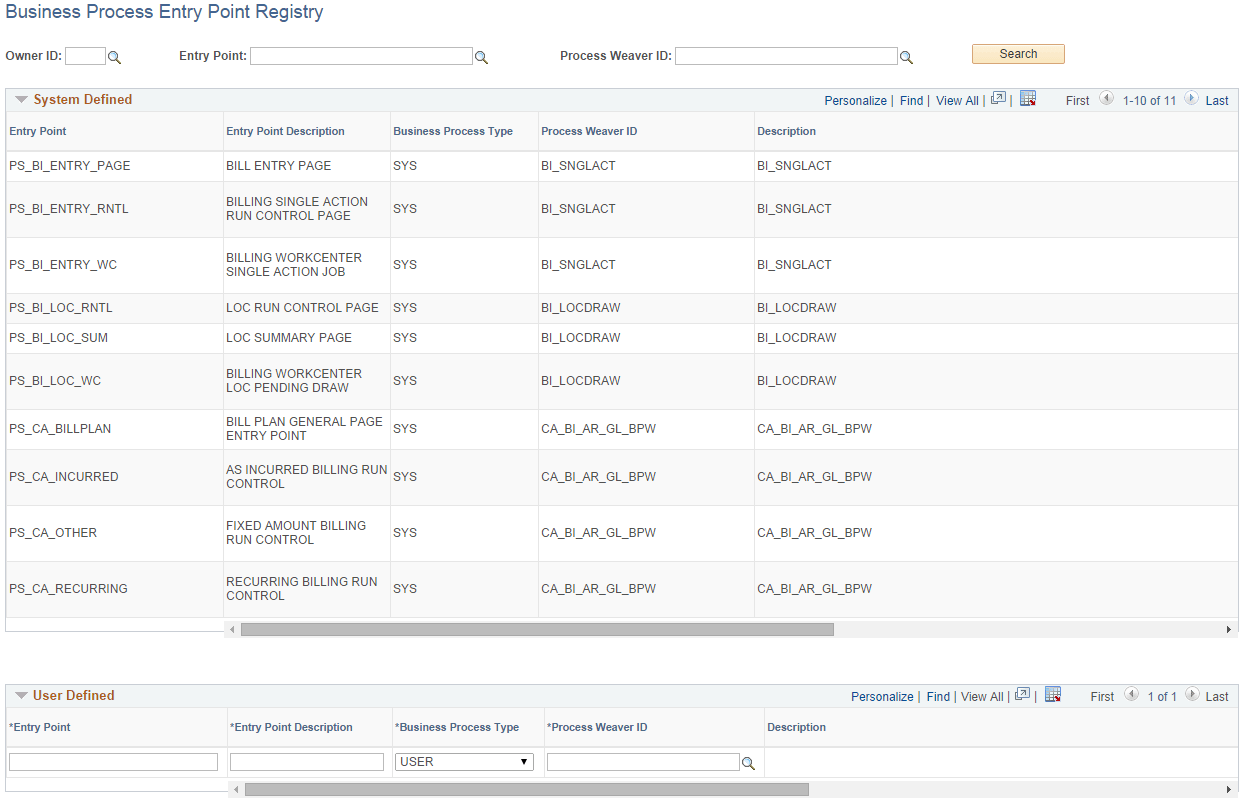
When there are no values in the search fields, the results display all system-defined and user-defined entry points.
| Field or Control | Description |
|---|---|
|
Owner ID |
Enter the owner ID of the entry point and click the Search button to return results by owner ID. |
System Defined
The System Defined data is display-only. PeopleSoft delivers entry points that are used by PeopleSoft applications.
User Defined
You can add your own entry points within the User Defined grid.
| Field or Control | Description |
|---|---|
|
Entry Point and Entry Point Description |
Select from all defined entry point IDs by entry point and description. The entry point allows the user to initiate the process as defined on the Business Process Definition page. See Defining Business Processes for more information about the Business Process Weaver definition referenced by the entry point. |
|
Business Process Type |
Select from these values:
|
|
Process Weaver ID and Process Weaver Description |
Select from all defined Business Process Weaver processes. |
|
Dynamic Run Control |
Select from these values: Y (yes) or N (no). Yes indicates that all BPW step run controls are configured at runtime in PeopleCode. There is no need to go to the Business Process Run Control page to configure step run control parameters. The Business Process Weaver step run controls must set up properly before the Business Process Weaver process is started. |
|
Active |
Indicates that an entry point is active or available to be used. |