Business Process Task Registry Page
Use the Business Process Task Registry page (BPW_TASK_TBL) to set up the tasks that will be executed in the Business Processes. Application developers typically use this page to register the programs, such as Process Scheduler processes, that are part of business processes.
Oracle delivers many defined tasks as System data. These are available to use in your Business Process Definitions.
Navigation:
This example illustrates the fields and controls on the Business Process Task Registry page. You can find definitions for the fields and controls later on this page.
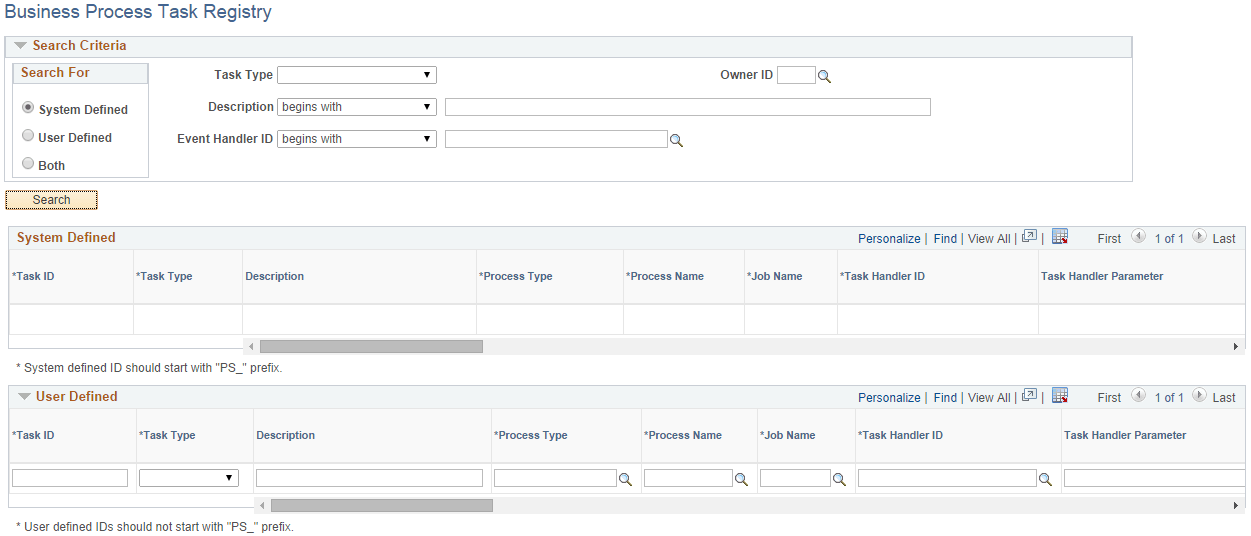
System Defined
The System Defined data is display-only. PeopleSoft delivers Task IDs that are used by PeopleSoft applications.
User Defined
You can add your own tasks within the User Defined group box. The Task ID must not start with “PS_”.
| Field or Control | Description |
|---|---|
|
Task ID |
Unique ID that is assigned to the task. It is used to reference the task in BPW. |
|
Task Type |
Indicates the type of task. Values are:
|
|
Description |
Description of the task. If you do not enter a description, the field adopts the description of the App Class, Job, or Process. |
|
Process Type and Process Name |
Fields are required when the Task Type is Process to specify the Process Type (for example, Application Engine) and the Process Name (for example, Application Engine program name). |
|
Job Name |
Required when the Task Type is Job to specify the Job to execute. |
|
Task Handler ID, Task Handler Parameter |
When the Task Type is App Class, the Task Handler ID must be entered to indicate the application class that is responsible for executing the task. Task Handler Parameter is optional and can be used to pass information to the Task Handler application class. |
|
Event Handler ID, Event Handler Parameter |
If an event handler is associated with the task, enter its App Class ID as Event Handler ID. Optionally populate the Event Handler Parameter to provide any parameter value to the event handler. |
|
Run Control Prompt Record |
Enter the record name of the run control record used by the task. This usually is keyed by user ID and run control ID. If it is provided, BPW can check the existing run controls and display the run control status on the Business Process Run Control and Review pages. |
|
Run Control Required |
If the Run Control Prompt Record is provided, you can indicate whether the run control is required before the task can be executed. If this is selected and if no run control is found, the step (task) cannot be started or executed. You will need to set up the run control and then manually start the step or choose to skip the step. |
|
Menu Name, Menu Bar Name, Item Name, Panel Name, Menu Action |
These fields enable you to set up the menu/component/page to the run control setup page for the task. If these are set up, you can open the run control setup page directly on the Business Process Run Control or Review pages. For batch processes or jobs, the menu action is always “Add”; therefore, Menu Action is not available when Task Type is Process or Job. |
|
Output Type, Output Format |
Select the output type and format for the task. |
Similar to the Application Class Registry page, if the Task ID is currently used by Business Process Weaver, then it cannot be changed or removed. The following are verified:
-
Business Process Definition
-
Business Process Run Control
-
Business Process Instance that has not been finished