Business Request Setup Page
Use the Business Request page (FLD_REQ_SETUP) to enable each field that you want to use in the request-approval process. This is the starting point for the Business Request and Approval functionality.
Navigation:
.
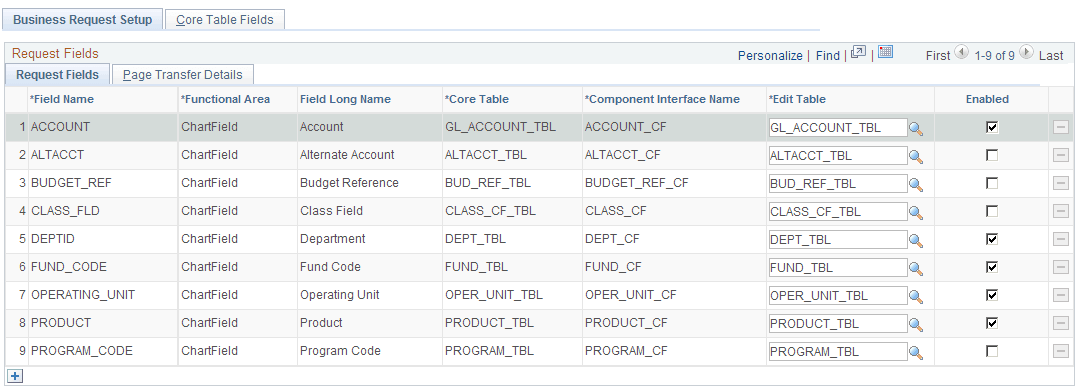
This example illustrates the fields and controls on the Business Request Setup - Request Fields tab. You can find definitions for the fields and controls later on this page.
Request Fields tab
Thirteen ChartFields are delivered on the Request Fields page and the rows cannot be deleted using this page. Account, Department, Fund Code, Operating Unit and Product are delivered as enabled, as they are the most commonly used.
Note:
If Project Costing is installed, the Project ID field is hidden. Also, if ChartField 1, ChartField 2, and ChartField 3 are not activated in ChartField Configuration, those rows are hidden as well.
| Field or Control | Description |
|---|---|
|
|
The button at the bottom of the grid leaves room for future field additions and customizations. In order to add to this page, you must have full technical understanding of this functionality. |
 (Add
a new row at row <number>
(Add
a new row at row <number>
Page Transfer Details tab
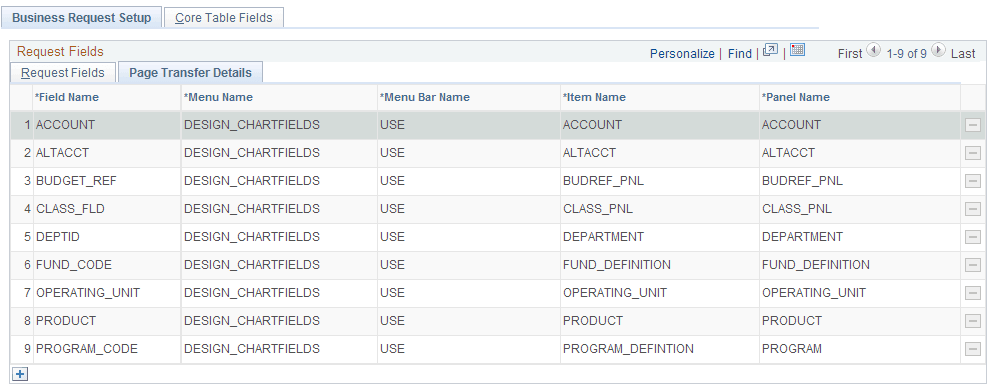
Click the Page Transfer Details tab on the Business Request Setup page to access the navigational details for each field’s entry page, which will be used by the system when performing the page transfer from the ChartField Request page to that field’s entry page:
This example illustrates the fields and controls on the Business Request Setup - Page Transfer Details tab.