Core Table Fields Page
Use the Core Table Fields page (FLD_REQ_S_FLDS) to enter the core table information for each field on the Business Request Setup page.
Navigation:
.
This example illustrates the fields and controls on the Core Table Fields Page. You can find definitions for the fields and controls later on this page.
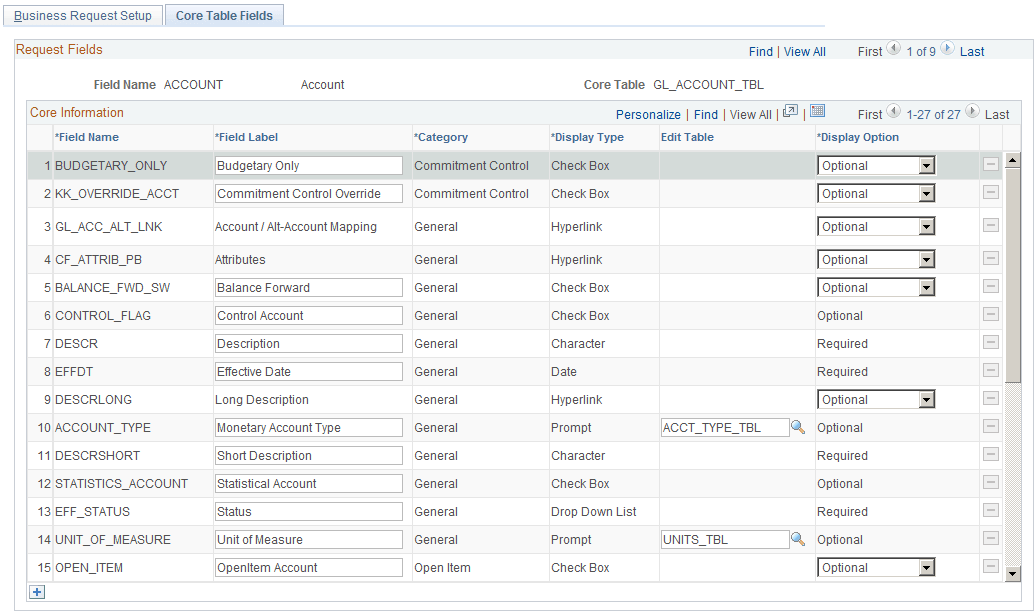
This page contains the core table field information of each field on the Business Request Setup page. For the delivered ChartFields, the core table fields that are currently available on the corresponding entry page cannot be deleted from the page.
| Field or Control | Description |
|---|---|
|
Field Label |
The default field labels appear as delivered. You can change the field label for any field (except those with a Hyperlink display type). For English, it is good practice to keep the delivered field labels unchanged, as they match those currently implemented on the delivered ChartField entry pages. For language implementations other than English, however, you must enter that language’s field labels here so that they may appear on the ChartField Request page. |
|
Edit Table |
Enter an edit record for the Prompt display type field names to be used for validation. |
|
Display Option |
If the core table field is required on the base table and has no default value defined on the record definition, its Display Option is set to Required and the field is disabled on this page. All other fields are delivered as Optional. There are some fields for the Account and Alternate Account tables that are set to Optional but are also disabled on this page. Due to the complicated relationships of those fields, the validations have to be handled by the ChartField Request page. If a core table field’s Display Option is not disabled on the Business Request Setup page, it can be overridden on the Business Request Template page, which is SetID-driven. |