Copying User Preferences
You can copy the user preferences from one User ID to another User ID.
User Preferences can be copied from one user ID to one or more User IDs.
Pages Used to Copy User Preferences
| Page Name | Definition Name | Usage |
|---|---|---|
|
OPR_DEF_TABLE_COPY |
Copy user preferences from one User ID to one or more User IDs. |
Copy User Preference Page
Use the Copy User Preference page (OPR_DEF_TABLE_COPY) to copy user preferences from one User ID to one or more User IDs.
Navigation:
This example illustrates the fields and controls on the Copy User Preference page.
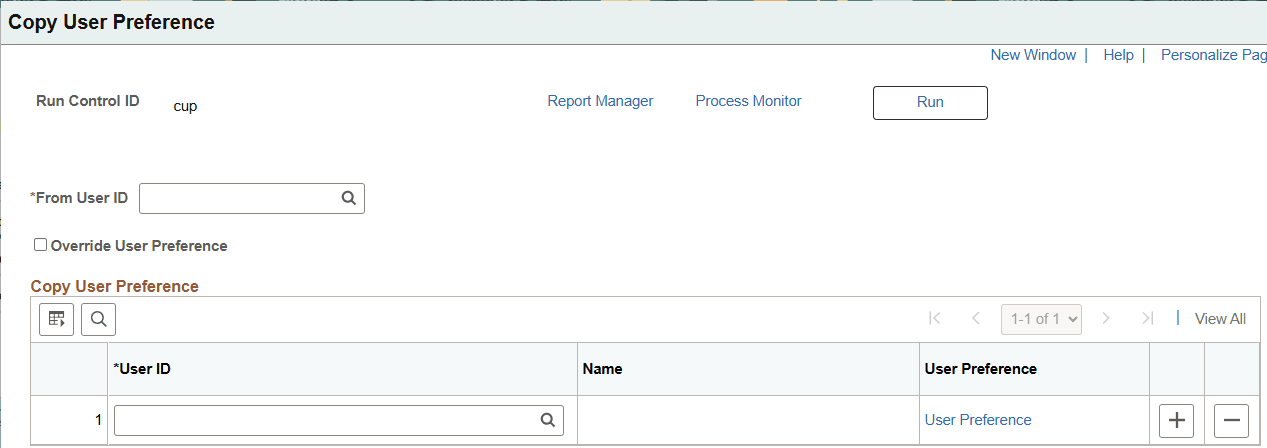
| Field or Control | Description |
|---|---|
|
From User ID |
Enter the User ID that you want to copy from. |
|
Override User Preference |
Select to indicate that you want to delete and copy the existing User Preferences. |
|
User ID |
Enter one or more User IDs that you wan to copy to. |
|
User Preference (link) |
Select to access the Define User Preferences - User Preference page where you can select from General Preferences or Product Preferences. |