Creating a New Work Field
You can add new ChartFields (customized) by using the ChartField Configuration Utility.
See PeopleSoft Application Fundamentals, Configuring ChartFields.
Create a work field for each new ChartField for which you want to secure using ChartField Security. These work fields are used as placeholders for the prompt edit tables that are dynamically assigned at runtime by the online processes.
To create a new work field for the new ChartField, clone an existing work field using Application Designer - Open Definition:
This example illustrates the fields and controls on the Application Designer - Open Definition (Field). You can find definitions for the fields and controls later on this page.
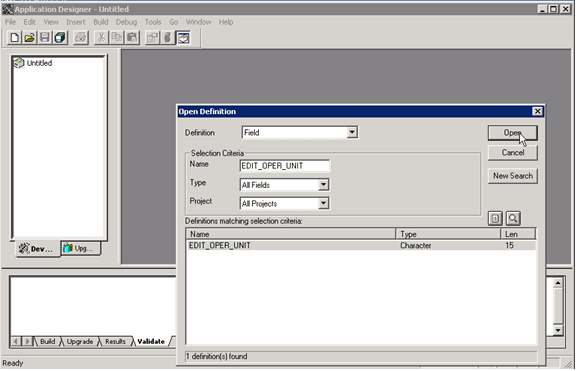
| Field or Control | Description |
|---|---|
|
Definition |
Select Field to open a field that you can clone for your new work field. |
|
Name |
As your selection criteria for the field, enter a prefix of EDIT_ to retrieve a list of work fields from which to select. |
|
Open |
Click this button to retrieve a list of fields from which to select. Open an existing field, such as EDIT_OPER_UNIT, by double-clicking. |
Click the Save icon and save as EDIT_<new ChartField name>. For example, if the new ChartField name is CFQ, then save the new work field as EDIT_CFQ. The work field must start with "EDIT_". It is not imperative, however, to include the new ChartField name in the work field name. Choose a concise and meaningful suffix. Do not change any of the field attributes, such as Field Type, Field Length, or Field Labels.