Define Allocation Step - Amount Fields Page
Use the Amount Fields page (ALLOC_AMOUNT) to define the amount field mapping between the pool, basis, target, and offset records.
Navigation:
This example illustrates the fields and controls on the Define Allocation Step - Amount Fields page. You can find definitions for the fields and controls later on this page.
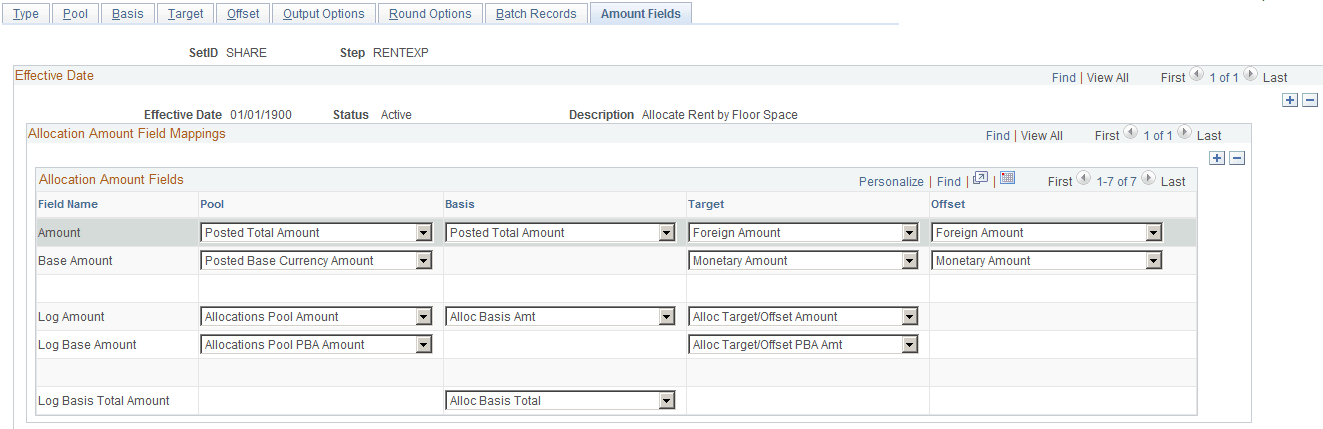
Use this page to define the fields in the chosen pool record that store the pool amounts, the fields in the chosen basis record that store the basis amounts, and where the system is to put the calculated amounts in the chosen target and offset records.
You can specify many sets of amount fields to perform allocations. For example, Project Costing can allocate on both resource amount and resource quantity fields in the same allocations. You can allocate pool resource amounts by using the basis resource amount percentage-to-total ratio and the pool resource quantity by using the basis resource quantity percentage-to-total ratio. You can also allocate both the pool resource amount and resource quantity using the basis resource amount percentage-to-total ratio. This page gives you the flexibility to define how the amounts are distributed from the fields in the pool record to the fields in the target and offset record.
General Ledger provides information about the total balances in the base currency and in individual transaction currency balances. Use the posted total amount field to get the total balance in the base currency. You can use the Posted Transaction Amount field to get the individual transaction currency balances. The Posted Transaction Amount (POSTED_TRAN_AMT) and Posted Total Amount (POSTED_TOTAL_AMT) fields exist in the ledger table to store different currency information.
The following simplified example illustrates the totals as recorded in the ledger for three transactions in three currencies: 1000 EUR, 100 USD, and 1000 GBP. Assume that the base currency is USD. Also, assume that 1 EUR is equal to 1.10 USD and that 1 GBP is equal to 1.58 USD. After the three transactions are recorded, the balances in the ledger are as follows:
| Currency | Posted Total Amount | Posted Base Currency Amount | Posted Transaction Amount |
|---|---|---|---|
|
EUR |
1000 |
1100 |
1000 |
|
USD |
2780 |
100 |
100 |
|
GBP |
1000 |
1580 |
1000 |
Note:
The Foreign Amount (FOREIGN_AMOUNT) field on the journal line is the transaction currency amount and is ultimately recorded in the posted transaction amount. The Monetary Amount (MONETARY_AMOUNT) field on the journal line is the equivalent of the base currency amount and is recorded in the posted base amount. It is important to keep this relationship between ledger and journal line fields in mind when the target and offset are journal lines.
| Field or Control | Description |
|---|---|
|
Fixed Pool Amount |
Enter an amount if the pool is not a record but a fixed amount. This field is not available if you do not specify Fixed Amount in the Pool Record Type field on the Pool page. |
|
Amount |
Select amount fields for the Pool, Basis, Target, and Offset. Depending on the records and fields that you specify on the Pool, Basis, Target and Offset pages, the system displays possible fields for the amount in the drop-down menus. Following are values for a RENTEXP allocation example that uses the ledger group record and the Account field for pool and basis and is allocating the pool amount to the journal record for target and offset. The values that are available in the drop-down menus differ depending on the records and fields that are specified for the basis, pool, target and offset, and thus for the product for which the allocation is intended. For example, the values are different for Project Costing and General Ledger allocations because the records and fields are different. You must thoroughly understand the relationship between records and fields in the product and between pool, basis, target, and offset before you can successfully complete the allocations.
|
|
Base Amount |
Select from the values for the Pool, Target, and Offset fields.
|
|
Transaction Amount |
Specify the Posted Transaction Amount to allocate the individual transaction currencies when the target record is specified as Any Table on the Target page. The allocation must be allocating to a record for this field to be available. It does not appear on the Amount page otherwise. |
|
Log Amount |
Select the appropriate fields from the Calculation Log record used to store the pool, basis, and target amounts to provide an audit trail. |
|
Log Base Amount |
Select the appropriate fields from the Calculation Log record:
|
|
Log Basis Total Amount |
The amount field in the Calculation Log record that is used to store the total basis amount for the audit trail. Dividing the value stored in the Log Basis field by the value stored in the Log Basis Total field gives you the percentage of pool amount distributed to the target. |
The following are examples of the setup for the amount fields for various allocation scenarios.
For example, if you are allocating on monetary amounts for General Ledger, the pool record might be Ledger Group ACTUALS and the Target record journals ACTUALS. The allocation fields are:
| Allocation Amount Fields | Field Value |
|---|---|
|
Pool Amount |
POSTED_TRAN_AMT |
|
Pool Base Amount |
POSTED_BASE_AMT |
|
Target Amount |
FOREIGN_AMOUNT |
|
Target Base Amount |
MONETARY_AMOUNT |
The actual pool and target records are LEDGER and JRNL_LN, respectively. The currency control fields that are defined in PeopleSoft Application Designer for the POSTED_TOTAL_AMT, POSTED_TRAN_AMT, and POSTED_BASE_AMT fields are the CURRENCY_CD and BASE_CURRENCY fields for the LEDGER record. The currency control fields that are defined in PeopleSoft Application Designer for the FOREIGN_AMOUNT and MONETARY_AMOUNT fields are the FOREIGN_CURRENCY and CURRENCY_CD fields for the JRNL_LN record.
Using these currency control field definitions, allocations automatically determine that the target record's FOREIGN_CURRENCY field value source is from the pool record's CURRENCY_CD field value, and the target record's CURRENCY_CD field value source is from the pool record's BASE_CURRENCY field value. You need not define the currency field values explicitly for the Target and Offset fields.
These currency control field values also determine the currency precision and rounding feature in the PeopleSoft Allocations process. For example, if the target record FOREIGN_CURRENCY field value is USD, the system rounds the FOREIGN_AMOUNT to the second decimal. If the target record FOREIGN_CURRENCY field value is JPY (Japanese yen), the system rounds the FOREIGN_AMOUNT to the integer.
The PeopleSoft Allocations process uses the target record's currency control field values to determine the currencies that are for the target and offset records. If you are allocating on fixed pool amounts, there is no pool record; you must specify the target and offset records' currency field values in the Target and Offset fields. For example, if you are allocating 100.00 USD, you enter 100 in the Fixed Pool Amount field on the Amount page. On the Target and Offset pages, specify the FOREIGN_CURRENCY and CURRENCY_CD fields in the Specify Field Values group box. Set the Source field value on the Target and Offset page to Value.
The following table is an example of the fields that are used when allocating on monetary amounts in PeopleSoft applications:
| Allocation Amount Field | Field Value |
|---|---|
|
Pool Amount |
POSTED_TRAN_AMT |
|
Pool Base Amount |
POSTED_BASE_AMT |
|
Basis Amount |
POSTED_TOTAL_AMT |
|
Target Amount |
FOREIGN_AMOUNT |
|
Target Base Amount |
MONETARY_AMOUNT |
|
Offset Amount |
FOREIGN_AMOUNT |
|
Offset Base Amount |
MONETARY_AMOUNT |
|
Pool Log Amt |
ALLOC_POOL_AMT |
|
Pool Log Base Amt |
ALLOC_POOL_PBA |
|
Basis Log Amt |
ALLOC_BASIS_AMT |
|
Basis Log Total |
ALLOC_BASIS_TOT |
|
Target Log Amt |
ALLOC_TARG_OFF_AMT |
|
Target Log Base Amt |
ALLOC_TARG_OFF_PBA |
The following example shows fields used when allocating to statistics amounts in PeopleSoft applications:
| Allocation Amount Field | Field Value |
|---|---|
|
Pool Amount |
POSTED_TOTAL_AMT |
|
Pool Base Amount |
optional |
|
Basis Amount |
POSTED_TOTAL_AMT |
|
Target Amount |
STATISTIC_AMOUNT |
|
Target Base Amount |
optional |
|
Offset Amount |
STATISTIC_AMOUNT |
|
Offset Base Amount |
optional |
|
Pool Log Amt |
ALLOC_POOL_AMT |
|
Pool Log Base Amt |
optional |
|
Basis Log Amt |
ALLOC_BASIS_AMT |
|
Basis Log Total |
ALLOC_BASIS_TOT |
|
Target Log Amt |
ALLOC_TARG_OFF_AMT |
|
Target Log Base Amt |
optional |
If you are multiplying a statistics pool amount (such as, hours) by a basis amount (such as , hourly rate) in PeopleSoft applications to create a monetary amount target, explicitly specify the FOREIGN_CURRENCY and CURRENCY_CD field values for the target and offset record. The amount fields are defined as follows:
| Allocation Amount Field | Field Value |
|---|---|
|
Pool Amount |
POSTED_TOTAL_AMT |
|
Pool Base Amount |
optional |
|
Basis Amount |
POSTED_TOTAL_AMT |
|
Target Amount |
FOREIGN_AMOUNT |
|
Target Base Amount |
MONETARY_AMOUNT |
|
Offset Amount |
FOREIGN_AMOUNT |
|
Offset Base Amount |
MONETARY_AMOUNT |
|
Pool Log Amt |
ALLOC_POOL_AMT |
|
Pool Log Base Amt |
optional |
|
Basis Log Amt |
ALLOC_BASIS_AMT |
|
Basis Log Total |
ALLOC_BASIS_TOT |
|
Target Log Amt |
ALLOC_TARG_OFF_AMT |
|
Target Log Base Amt |
ALLOC_TARG_OFF_PBA |
If you are creating budgets for next year in PeopleSoft applications and you do not want to carry all foreign currencies in the budget ledger but instead you want to use the consolidated total amounts for all currencies, you can specify the currency code equal to the base currency for your pool. Define the amount fields as follows:
| Allocation Amount Field | Field Value |
|---|---|
|
Pool Amount |
POSTED_TRAN_AMT |
|
Pool Base Amount |
POSTED_BASE_AMT |
|
Basis Amount |
POSTED_TOTAL_AMT |
|
Target Amount |
FOREIGN_AMOUNT |
|
Target Base Amount |
MONETARY AMOUNT |
|
Offset Amount |
FOREIGN_AMOUNT |
|
Offset Base Amount |
MONETARY_AMOUNT |
|
Pool Log Amt |
ALLOC_POOL_AMT |
|
Pool Log Base Amt |
ALLOC_POOL_PBA |
|
Basis Log Amt |
ALLOC_BASIS_AMT |
|
Basis Log Total |
ALLOC_BASIS_TOT |
|
Target Log Amt |
ALLOC_TARG_OFF_AMT |
|
Target Log Base Amt |
ALLOC_TARG_OFF_PBA |