Define Allocation Step - Batch Records Page
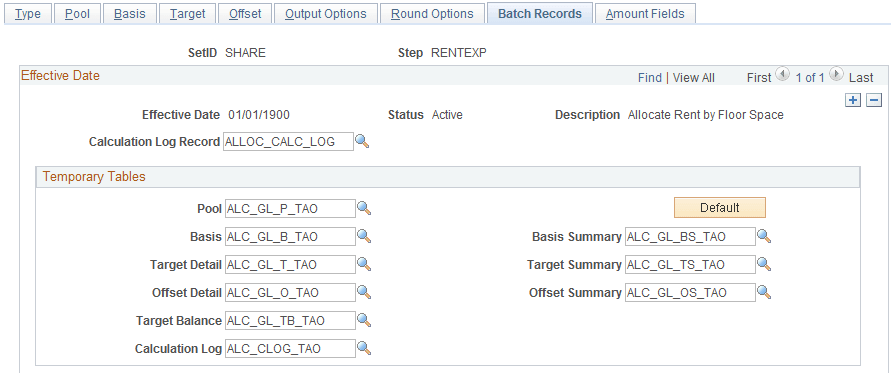
Use the Batch Records page (ALLOC_RECNAME) to specify the batch temporary tables that are used in the PeopleSoft Allocations process.
Navigation:
Allocations, Define and Perform Allocations, Define Allocation Step, Batch Records.
This example illustrates the fields and controls on the Define Allocation Step - Batch Records page. You can find definitions for the fields and controls later on this page.
| Field or Control | Description |
|---|---|
|
Calculation Log Record |
Specify to create a calculation log for a complete audit trail for debugging. Select the Create Calculation Log option on the Allocation Request page. You can use the delivered calculation log record, ALLOC_CALC_LOG, for all allocation steps that are processed against the actuals ledger (but not the budgets ledger, which might have ChartFields that are different from the actuals ledger). If the allocation is not processed against the actuals ledger, modify the Calculation Log Record field or create a unique record. |
|
Pool |
Specify the temporary table for the pool data. The PeopleSoft Allocations process uses this table to store the temporary data for the pool. |
|
Basis |
Specify the temporary table for the basis data. The PeopleSoft Allocations process uses this table to store the temporary data for the basis. |
|
Target Detail |
Specify the temporary table for the target detail data. The PeopleSoft Allocations process uses this table to store the temporary data for the target. |
|
Target Summary |
Specify the temporary table for the target summary data. The PeopleSoft Allocations process uses this table to store the summarized data for the target and offset. |
|
Offset Detail |
Specify the temporary table for the offset detail data. When allocating to a journal, sometimes the process uses a separate temporary table to store the offset data. |
|
Offset Summary |
Specify the temporary table for the Offset Summary data. Data is summarized from the target record or journals. When allocating to a journal, sometimes the process uses a separate temporary table to store the offset summary data. |
|
Target Balance |
Specify the temporary table for the target balance data. The PeopleSoft Allocations process uses this table to store the target balance lines, which are necessary to balance the target and offset against the pool amount. |
|
Calculation Log |
Specify the temporary table (ALC_CLOG_TAO) to the calculation log. |
|
Default |
Click the Default button to assign the default temporary tables. The process assigns the temporary tables based on the setup of the pool, basis, target, and offset. |
PeopleSoft delivers these standard temporary (TAO) tables:
| Temporary Table | General Ledger | Projects |
|---|---|---|
|
Calculation log |
ALC_CLOG_TAO |
ALC_CLOG_TAO |
|
Pool |
ALC_GL_P_TAO |
ALC_PC_P_TAO |
|
Basis |
ALC_GL_B_TAO |
ALC_PC_B_TAO |
|
Basis Summary |
ALC_GL_BS_TAO |
ALC_PC_BS_TAO |
|
Target Detail |
ALC_GL_T_TAO |
ALC_PC_T_TAO |
|
Target Summary |
ALC_GL_TS_TAO |
ALC_PC_TS_TAO |
|
Offset Detail |
ALC_GL_O_TAO |
ALC_PC_T_TAO |
|
Offset Summary |
ALC_GL_OS_TAO |
ALC_PC_TS_TAO |
|
Target Balance |
ALC_GL_TB_TAO |
ALC_PC_TB_TAO |
Use the standard General Ledger TAO tables to allocate ledger (including all ledger, commitment control, projects, and budgets) and journal data.
Use the standard Project Costing TAO tables to allocate projects resource data.
Note:
When allocating to a journal, the PeopleSoft Allocations process sometimes uses a separate temporary table for the offset detail and offset summary data in order to optimize the processing performance. The process determines if it must use a separate temporary table at runtime. Even if you specify a different table for the offset detail and summary, the process might not use a separate temporary table to process the offset data. There are no delivered offset detail and summary TAO tables for projects because these tables are not used to allocate to a journal.
PeopleSoft recommends that you use the standard delivered TAO tables.
Note:
If you specify the value Any Table in the Pool Record Type field, add any additional fields that might be required to the delivered ALC_GL_P_TAO table.
If you are using your own customized TAO tables, use the delivered TAO tables as a model. Open the delivered TAO table and do a save as to create a TAO table. The following fields are required:
-
PROCESS_INSTANCE, LOGICAL_RECORDS, BUSINESS_UNIT, BUSINESS_UNIT_IU.
-
ChartField that are applicable to the process, such as Account, DEPTID, and so on.
-
Amount Fields and the currency control fields that are applicable to the amounts that are allocated.
This should also include the calculation log pool and basis amount fields, namely, ALLOC_POOL_AMT, ALLOC_POOL_PBA, ALLOC_POOL_PTR, ALLOC_BASIS_AMT, ALLOC_BASIS_TOT.
-
Fields required for interunit processing, IU_TRAN_GRP_NBR, IU_ANCHOR_FLG.
-
Fields required for intraunit processing, CF_VALUE1 to CF_VALUE10.
-
Field required for base currency conversion, BASE_CURRENCY_POOL, RATE_MULT, RATE_DIV.
-
Fields required for time span, ACCOUNTING_PERIOD, FISCAL_YEAR.
-
Other fields that are applicable to the setup.
For example, if you are allocating to a specific ledger, add field LEDGER to the TAO tables.
Note:
To increase performance, the PeopleSoft Allocations process attempts to use a dedicated temporary table for all TAO tables. If you are using your own TAO tables, use dedicated temporary tables that are created in PeopleSoft Application Designer and define the record type as a temporary table. Define the temporary tables in the definition of the PeopleSoft Allocations process (FS_ALLC).