Define Allocation Step - Basis Page
Use the Define Allocation Step - Basis page (ALLOC_BASIS) to determine the basis of the allocation or how the pool amount is to be allocated to the target.
Navigation:
Allocations, Define and Perform Allocations, Define Allocation Step, Basis
This example illustrates the fields and controls on the Define Allocation Step - Basis page. You can find definitions for the fields and controls later on this page.
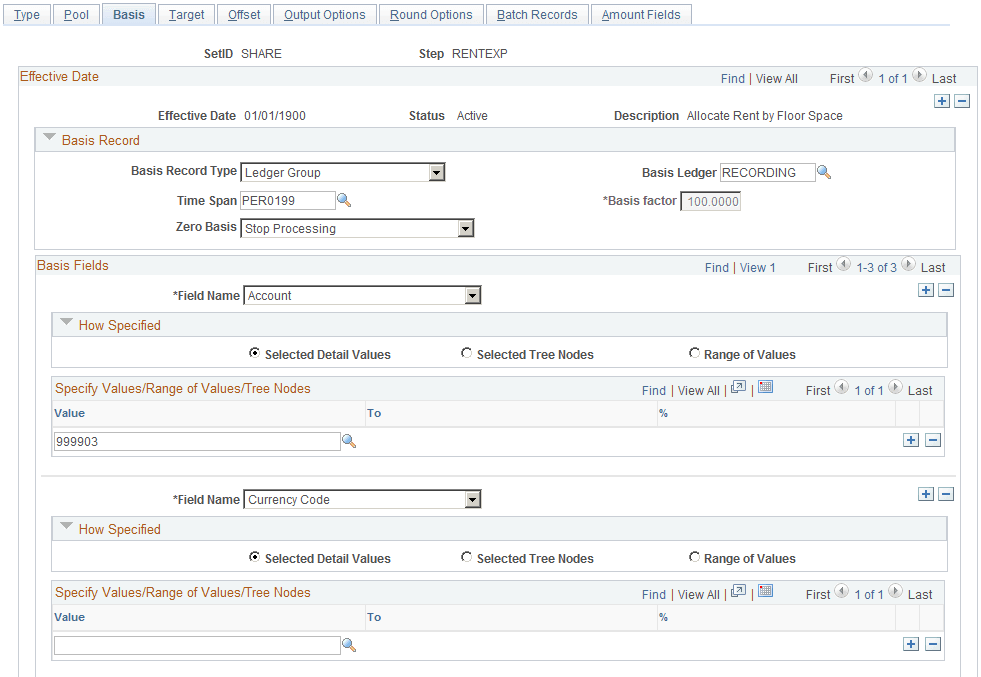
The allocation type that you select on the Type page determines much of the Basis page. The following describes what occurs for each allocation type:
-
Copy: No basis is required and all fields on the Basis page are unavailable.
-
Spread Evenly: The pool amount is divided evenly across the basis field values that are specified in the basis. No basis rows are required to exist in the basis record that is specified. You must still specify a value in the Basis Record Type field so that the system can provide a prompt table listing for the Field Name field in the Basis Fields group box.
In the How Specified group box, you can use Selected Detail Values, Selected Tree Nodes, or Range of Values fields to specify field values.
You can specify more than one field name; the system divides the pool amount evenly across all basis field value combinations.
Suppose that you spread evenly across department IDs 0100 and 0200 and products A, B, and C. In this case, each department ID and product combination (that is, DeptID 0100 and Product A, DeptID 0100 and Product B, and so on) receives 1/6 of the pool amount.
Note:
This is a simplified example of spread evenly allocation type to illustrate how the amounts are distributed across the target. However, depending on the distribute odd cents option, one of the departments might contain the odd cents that are required to offset the allocated amount against the pool. The distribution of the odd cents is covered in the values in the Selecting Rounding Options section.
-
Allocate on Fixed Basis: This is a variation of prorata allocation, where the percentage of the prorate is fixed. As withSpread Evenly, no basis rows are required to exist in the basis record that is specified. You must still specify the basis record type so that the system can provide a prompt table listing on the basis field name.
You can use only the Selected Detail Values field to specify basis field values, and you can specify more than one value in the Field Name field.
You must also specify the fixed % (percent) for each field value in the Specify Value/Range of Values/Tree Nodes edit box. The total of the percentage for one field does not have to add up to 100 percent, but the system uses the percentages to calculate the actual percent-to-total for each value.
For example, if you specify 10 percent for DeptID 0100 and 40 percent for DeptID 0200, the system allocates 20 percent of the pool amount to DeptID 0100 and 80 percent to DeptID 0200.
-
Prorata with Record Basis: Specify basis fields in the same way that you do the pool. Basis rows are selected from the basis record, and their amounts are used to calculate a percent-to-total to distribute the pool amount to each target.
-
Arithmetic Operation: Like Prorata with Record Basis, basis rows are selected from the basis record, and you specify basis in the same way that you do the pool. Target amounts are calculated by performing the mathematical operation between each pool and basis amount.
For example, suppose that the total November rent expense for US004 is 110,000.00 USD, paid through the administrative division. This expense must be divided among six divisions. The basis for the rent expense allocation is the amount of floor space that is occupied each month by each division. Floor space is maintained in statistical account 999903. Department ID is defined using the MFG_DEPARTMENTS tree, the DIVISION tree level, and the USA tree node. The following table indicates how much floor space each division uses:
| Division | Floor Space | Preallocation Expense |
|---|---|---|
|
Administration |
4000 |
110000 USD |
|
Sales/Marketing |
4000 |
|
|
Customer Service |
2000 |
|
|
Engineering |
4000 |
|
|
Manufacturing |
6000 |
|
|
Other (No Department Value) |
2000 |
|
|
Total |
22,000 square feet |
110000 USD |
When the amounts are allocated, each division is debited for its share of the rent expense:
| Division | Floor Space | Allocated Expense |
|---|---|---|
|
Administration |
4000 |
20000 USD |
|
Sales/Marketing |
4000 |
20000 USD |
|
Customer Service |
2000 |
10000 USD |
|
Engineering |
4000 |
20000 USD |
|
Manufacturing |
6000 |
30000 USD |
|
Other (No Department Value) |
2000 |
10000 USD |
|
Total |
22000 square feet |
110000 USD |
| Field or Control | Description |
|---|---|
|
Basis Record Type |
Specify from the following values:
Note: If you specify the value Any Table in the Basis Record Type field, add any additional fields that might be required to the delivered ALC_GL_B_TAO table. |
|
Time Span |
Specify the basis time span if the allocation type is prorata with record basis or arithmetic operation. Basis time span works in the same way as the pool time span, except that you have an option (Basis Span Opt) to combine or split basis amounts for a multiple periods' basis time span if you also specify a multiple periods target time span. |
|
Basis Factor |
Specify a percentage to apply against the basis. The factor is applicable only to arithmetic operations. |
|
Zero Basis |
Select an option to indicate how the system should proceed when the amount of the basis record retrieved is zero if the allocation type is prorata with record basis or arithmetic operation:
When you use this option, any selection criteria field that you use for the basis must be explicitly defined. For example, if on the Target/Offset pages one of the fields has a source defined as group by pool and basis, then this field must also be defined in the basis. Before the PeopleSoft Allocations process selects basis records, it groups them based on how the target and offset fields are specified. It uses the Zero Basis option logic only if the total amounts of the group of basis records add up to zero. If some individual basis amounts are zero, but the total amounts of the group of the basis records are not zero, the system still process this group of basis records. The Zero Basis option works independently of the Zero Pool option. You can select different options for them, and the system proceeds based on those selections. If no basis rows are selected based on the time span and selection criteria that is specified in the Basis Field field, allocations stops this step unless you select the Calc No Rows as Zero option in the Zero Basis Option field. You receive the message, "No record row exist for the basis …," and whether the system continues processing the next step in a group depends on the option that you specified in the Continue field on the Allocations Group page. |
|
Field Name |
Enter the basis field name that the PeopleSoft Allocations process uses in selecting only certain rows from the basis record. If you do not explicitly specify the BUSINESS_UNIT field value, the system uses the business unit that is specified on the Allocation Request page to select basis rows. |
Refer to the Pool page for a description of the remaining fields on the Basis page.
Note:
Allocations does not support using summary ledgers in the basis.
Basis Exceptions Page
The ability to define exceptions to included or excluded ranges of values provides the ability to refine selection criteria while reducing the need for multiple rows or steps.
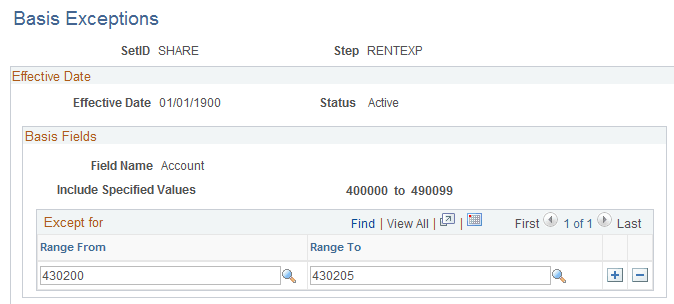
Use the Basis Exceptions page (ALLOC_BASISX) to enter basis exception ranges.
Navigation:
Select the Range of Values option, provide the range values, and click the link in the Exceptions column on the Define Allocation Step - Basis page.
This example illustrates the fields and controls on the Basis Exceptions page. You can find definitions for the fields and controls later on this page.
| Field or Control | Description |
|---|---|
|
Range From and Range To |
Enter the range of values that are exceptions to the associated range of either included values or excluded values. If you selected the Include Specified Values field for the Include/Exclude option on the Basis page, the exceptions that you define on this page are exceptions to the included range that you entered. If you selected the Exclude Specified Values field for the Include/Exclude option on the Basis page, the exceptions that you define on this page are exceptions to the excluded range that you entered. |