Define Allocation Step - Round Options Page
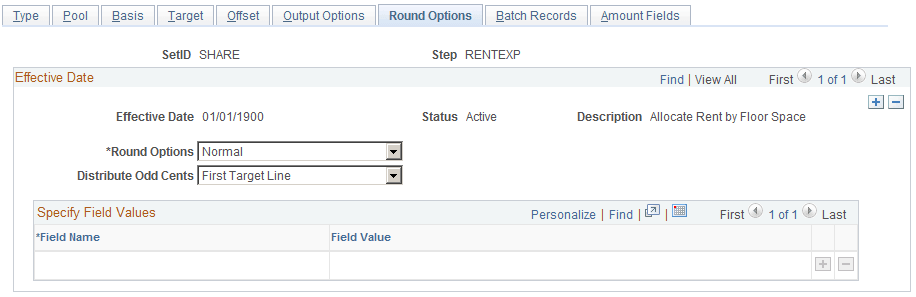
Use the Round Options page (ALLOC_ROUND_OPTN) to define the method for rounding the allocation amount and distributing odd cents.
This option is valid for only these allocation types: Spread Evenly, Allocate of Fixed Basis, and Prorata with Record Basis.
Navigation:
A
This example illustrates the fields and controls on the Define Allocation Step - Round Options page. You can find definitions for the fields and controls later on this page.
| Field or Control | Description |
|---|---|
|
Round Options |
Specify the method to use to round the allocation amount from the following options:
|
|
Distribute Odd Cents |
For allocation types of prorata, spread even, and fixed basis, the process balances the target and offset amounts to the pool amount that is allocated. In other words, the process attempts to allocate 100 percent of the pool amount to the target and offset amount, sometimes resulting in odd cents. The Distribute Odd Cents option gives you the flexibility to determine where to distribute odd cents. Because allocation processing is set based rather than row-by-row to improve performance, this option is required for allocation types of prorata, spread even, and fixed basis.
If you are allocating within ChartFields or grouping by ChartFields in the definition, the process distributes odd cents with each group, ChartField value. Note: PeopleSoft recommends that you select the first two options for optimum performance. |
|
Field Name and Field Value |
If you select Specify ChartFields as the Distribute Odd Cents option, enter the ChartField combination to which you want to distribute the odd cents. Enter the ChartField in the Field Name field and the ChartField value in the Field Value field. For example, enter ACCOUNT for the field name and 100000 for the field value. |
The following examples show how the process rounds the allocation amounts if you select one of the options on this page:
| Field or Control | Description |
|---|---|
|
Allocation Type |
Spread evenly. |
|
Pool Amount |
1000.00 with a currency precision of two for USD. |
|
Pool Factor |
100.00. |
|
Basis |
Dept ID: 11001, 12000, 13000, 14000, 15000, 16000. |
|
Target |
Account: 100000. Dept ID: values from basis. |
Example 1
The first example shows how the process rounds the allocation amounts if you specify the following options:
| Field or Control | Description |
|---|---|
|
Distribute Odd Cents |
Specify ChartField. Account: 100004. Dept ID: 41000. |
|
Round Options |
Normal. |
The process uses the following formula to calculate the amounts:
Allocated Amount = (Pool Amount (Pool Factor/100)) (Basis Amount/Total Basis).
(1000 (1/6)) = 166.67 rounded:
| Account | Dept ID | Allocated Amount |
|---|---|---|
|
100000 |
11001 |
166.67 |
|
100000 |
12000 |
166.67 |
|
100000 |
13000 |
166.67 |
|
100000 |
14000 |
166.67 |
|
100000 |
15000 |
166.67 |
|
100000 |
16000 |
166.67 |
|
100004 |
41000 |
-0.02 |
Example 2
The second example shows how the process rounds the allocation amounts if you specify the following options:
| Field or Control | Description |
|---|---|
|
Distribute Odd Cents |
Last target line. |
|
Round Options |
Round up. |
The process uses the following formula to calculate the amounts:
Allocated Amount = (Pool Amount (Pool Factor/100)) (Basis Amount/Total Basis) + .005.
(1000 (1/6)) = 166.67 rounded:
| Account | Dept ID | Allocated Amount |
|---|---|---|
|
100000 |
11001 |
166.67 |
|
100000 |
12000 |
166.67 |
|
100000 |
13000 |
166.67 |
|
100000 |
14000 |
166.67 |
|
100000 |
15000 |
166.67 |
|
100000 |
16000 |
166.65 |
Example 3
The third example shows how the process rounds the allocation amounts if you specify the following options:
| Field or Control | Description |
|---|---|
|
Distribute Odd Cents |
Largest target. |
|
Round Options |
Round down. |
The process uses the following formula to calculate the amounts:
Allocated Amount = (Pool Amount (Pool Factor/100)) (Basis Amount/Total Basis) - .005.
(1000 (1/6)) = 166.67 rounded:
| Account | Dept ID | Allocated Amount |
|---|---|---|
|
100000 |
11001 |
166.70 |
|
100000 |
12000 |
166.66 |
|
100000 |
13000 |
166.66 |
|
100000 |
14000 |
166.66 |
|
100000 |
15000 |
166.66 |
|
100000 |
16000 |
166.66 |
Related Topics