Define Allocation Step - Target Page
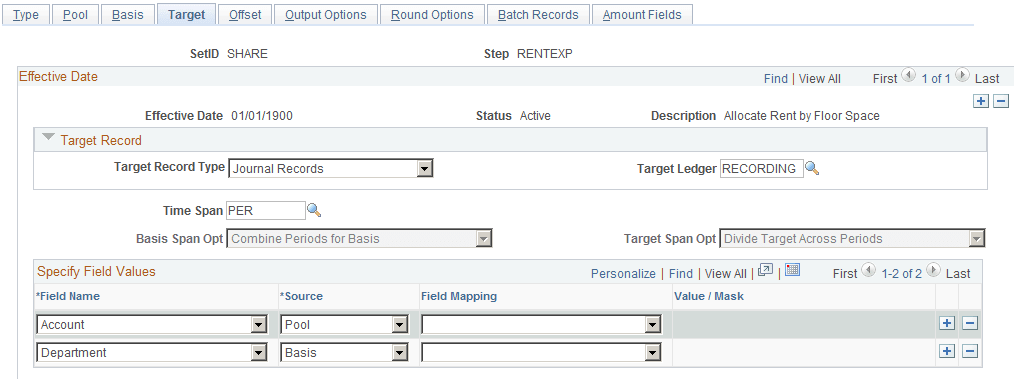
Use the Define Allocation Step - Target page (ALLOC_TARGET) to define the destination for the allocation or the target record (journal or any table) and target field values.
Navigation:
Allocations, Define and Perform Allocations, Define Allocation Step, Target
This example illustrates the fields and controls on the Define Allocation Step - Target page. You can find definitions for the fields and controls later on this page.
| Field or Control | Description |
|---|---|
|
Target Record Type |
Select one of the following:
|
|
Time Span |
Use to specify the output for a single or multiple accounting periods for the target. Relative time spans, such as PER (current period activity), create the target relative to the as of date that is specified on the Allocation Request page. If the Target Record Type value is Journals Records, you must specify the time span value. If the target record is a table that has both FISCAL_YEAR and ACCOUNTING_PERIOD fields, you have the option to specify the time span value. If the target record is a table that does not have both FISCAL_YEAR and ACCOUNTING_PERIOD fields, you cannot specify the time span value. If you do not specify the time span value, the system populates both FISCAL_YEAR and ACCOUNTING_PERIOD with a zero value in the target record. |
|
Basis Span Opt (basis span option) |
If you use a multiperiod time span for the basis and target, select one of the following in the Basis Span Optfield:
|
| Field or Control | Description |
|---|---|
|
Target Span Opt (target span option) |
If you select a multiple period time span for the target, you must specify the Target Span Opt field when the basis time span is either a single period or multiple periods (the Basis Span Opt field is Combine Periods for Basis):
|
|
Field Name |
If the target record is journals, the target record name is actually the journal line record name that is defined on the ledger template for the ledger group. The Field Name prompt table lists all fields that are in the target record. The system validates the Field Name field value that is entered against the record when you save this allocation step definition. Typically, you include any fields that are required by the target record including all the keys and any fields that affect functionality and those that you might decide are mandatory. |
|
Source |
Provides a convenient way to populate the target field values, particularly if the values are from the pool or basis records. You need not reenter them here, just prompt for the appropriate option and choose from the following:
|
|
Field Mapping |
If the source is from Pool, Basis, or Group by, you can specify field mapping for those occasions when the field name for the pool or basis record differs from the field name that is in the target record. For example, this could occur if the Product field value for the target record must come from the Project field value of the pool record. |
|
Value/Mask |
If you specify a fixed value in the Source field, use this Value/Mask field for character or date-type fields. You can enter a fixed date in one of the following formats: mmddyy, mm/dd/yy, or mm/dd/yyyy. |