Defining Cross-Application User Preferences
Use the User Preferences component (OPR_DEFAULT) to define cross-application user preferences.
Use the OPR_DEFAULT_FIN component interface to load data into the tables for this component.
Pages Used to Define Cross-Application User Preferences
| Page Name | Definition Name | Usage |
|---|---|---|
|
OPR_DEF_TABLE_FS1 |
Define overall default user preferences for specific PeopleSoft system users. |
|
|
OPR_DEF_TABLE_OLE1 |
Identify the object linking and embedding (OLE) information, namely the client operating system and the user's web browser. |
|
|
OPR_DEF_TBL_RTM |
Specify by source transaction the process groups that a user can use for on-demand processing. |
Related Topics
User Preferences - Overall Preferences Page
Use the Overall Preferences page (OPR_DEF_TABLE_FS1) to define overall default user preferences for specific PeopleSoft system users.
Navigation:
This example illustrates the fields and controls on the User Preferences - Overall Preferences page. You can find definitions for the fields and controls later on this page.
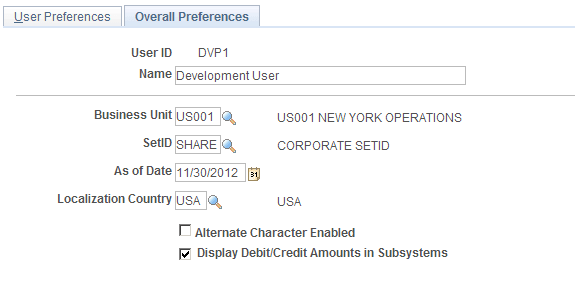
| Field or Control | Description |
|---|---|
|
Business Unit and SetID |
Select values that become the user's default values in business unit and SetID search fields. |
|
As of Date |
Displays the default as of date for the Combo Edit process. |
|
Localization Country |
Displays the default localization country for this user ID. |
|
Alternate Character Enabled |
Select to activate alternate description buttons or links, which appear to the right of fields on many of the application pages. Click a button or link to enter or display alternate characters on the auxiliary page that appears. |
|
Display Debit/Credit Amounts in Subsystems |
Select to display debit and credit amounts of the default business unit on journal entry and inquiry pages. A subsystem is any PeopleSoft application, such as Payables or Receivables, that contributes entries to PeopleSoft General Ledger. |
Related Topics
OLE Information Page
Use the OLE Information (object linking and embedding information) page (OPR_DEF_TABLE_OLE1) to identify the client operating system and the user's web browser.
Navigation:
OLE functionality enables you to store internet addresses with vendor identification information. When using a page that offers web access (such as the Location page in the Vendor Information component (VNDR_ID), users can click a button or link that activates a web browser to access the vendor's website.
| Field or Control | Description |
|---|---|
|
Client Operating System |
Select the user's operating system. |
|
WWW Browser (World Wide Web browser) |
Select the user's web browser. |
Note:
Some browsers do not support an OLE interface that enables this function.