My Home - My Work Section

Use the My Home - My Work section (EOHP_MYWORK_SCTN_LP) to access tiles for common, everyday work.

Navigation:

The My Work section appears on a My Home landing page when a user signs in.

This example illustrates the fields and controls in the My Work section.
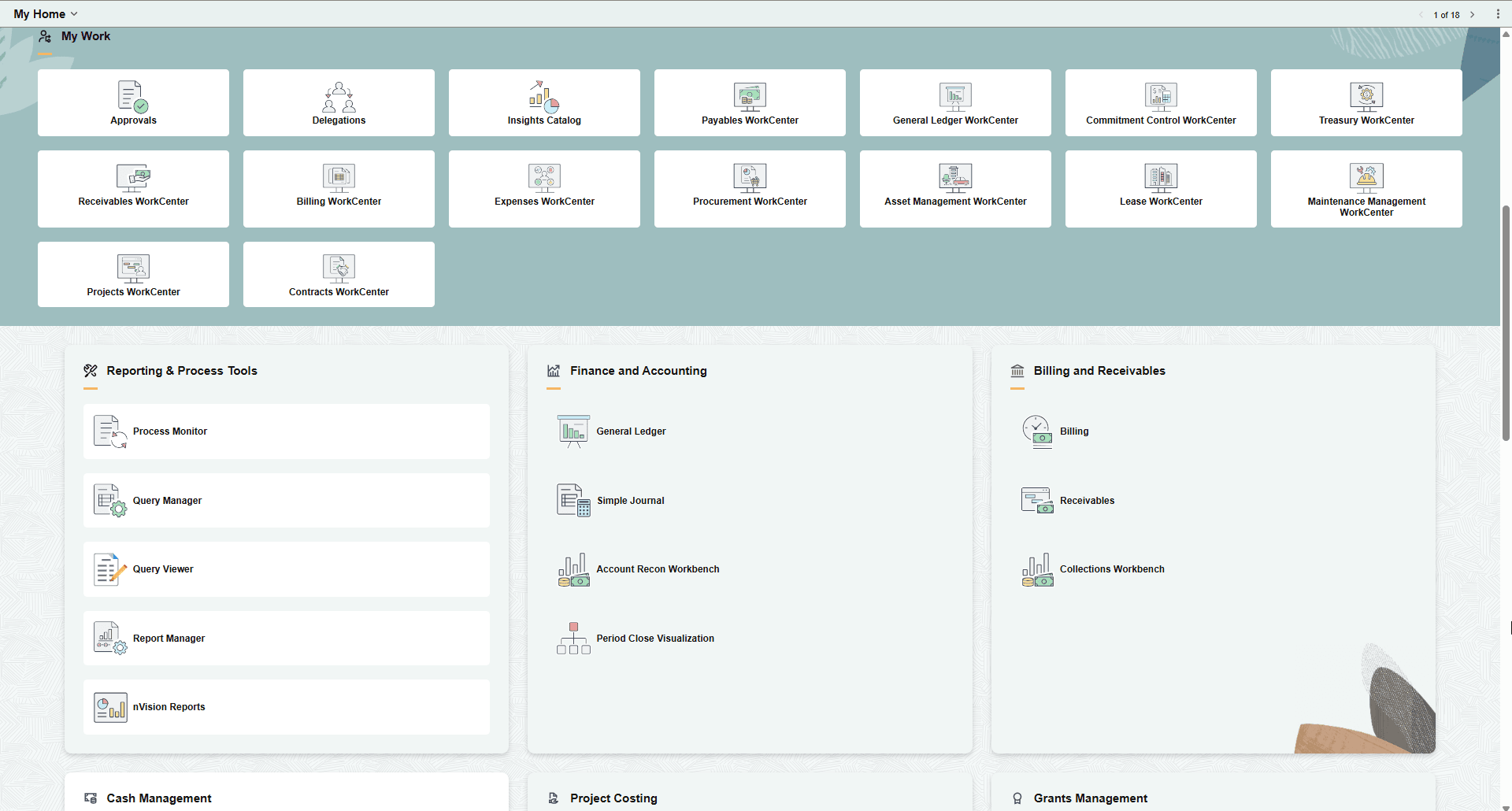
My Home - My Work

The My Work section can consist of multiple sections and vary, based on roles and permissions.

My Work: Tiles

The top row of the My Work section displays a standard set of common tiles for users. This table lists the tiles that are delivered and can appear in this section.

Tile Description

Approvals

Select to access the Pending Approvals Page.

Asset Management WorkCenter

Select to access the PeopleSoft Asset Management: Asset Management WorkCenter page.

Billing WorkCenter

Select to access the PeopleSoft Billing: Billing WorkCenter - My Work (Fluid) page.

Commitment Control WorkCenter

Select to access the PeopleSoft Commitment Control: Commitment Control WorkCenter Page.

Contracts WorkCenter

Select to access the PeopleSoft Contracts: Contracts WorkCenter Page.

Delegations

Select to access the Enterprise Components: Working with Self-Service Delegation

Expenses WorkCenter

Select to access the PeopleSoft Expenses: Expenses WorkCenter - My Work (Fluid) page.

General Ledger WorkCenter

Select to access the PeopleSoft General Ledger: General Ledger WorkCenter Page (Fluid).

Insights Catalog

Select to access the Insights Catalog (Navigation Collection).

Lease WorkCenter

Select to access the PeopleSoft Lease Administration: Lease WorkCenter - My Work page.

Maintenance Management WorkCenter

Select to access the Maintenance Management WorkCenter. See PeopleSoft Maintenance Management: Understanding the Maintenance Management WorkCenter.

Payables WorkCenter

Select to access the Payables WorkCenter. See PeopleSoft Payables: Understanding the PeopleSoft Fluid Payables WorkCenter.

Procurement WorkCenter

Select to access the PeopleSoft Purchasing: Procurement WorkCenter Page.

Projects WorkCenter

Select to access the PeopleSoft Project Costing: Projects WorkCenter page.

Receivables WorkCenter

Select to access the Receivables WorkCenter. See PeopleSoft Receivables: Understanding the PeopleSoft Fluid Receivables WorkCenter.

Treasury WorkCenter

Select to access the Treasury WorkCenter. See PeopleSoft Cash Management: Understanding the PeopleSoft Fluid Treasury WorkCenter.

My Work: Sections

Section templates are available to appear within the My Work section, which displays a standard set of common tiles. This table lists the tiles that are delivered and can appear in this section.

Section Description

My Work - Asset Tracking Section

See Using the My Work - Asset Tracking Section.

My Work - Billing and Receivables Section

See Using the My Work - Billing and Receivables Section.

My Work - Cash Management Section

See Using the My Work - Cash Management Section

My Work - Customer Contracts Section

See Using the My Work - Customer Contracts Section.

My Work - eProcurement Section

See Using the My Work - eProcurement Section.

My Work - Finance and Accounting Section

See Using the My Work - Finance and Accounting Section

My Work - Grants Management Section

See Using the My Work - Grants Management Section.

My Work - Mobile Technician Section

See Using the My Work - Mobile Technician Section.

My Work - Project Costing Section

See Using the My Work - Project Costing Section.

My Work - Reporting & Process Tools Section

See Using the My Work - Reporting & Process Tools Section.