Performing ChartField Configurations for New Products and Application Fixes
Page Used to Configure ChartFields for Projects Containing Application Fixes
| Page Name | Definition Name | Usage |
|---|---|---|
|
RUN_CF_CONFIG |
Configure updates and fixes to conform to your ChartField configurations before applying the update or fix to your system. |
Configuration by Project Page
Use the Configuration by Project page (RUN_CF_CONFIG) to configure updates and fixes to conform to your ChartField configurations before applying the update or fix to your system.
Navigation:
This example illustrates the fields and controls on the Configuration by Project page. You can find definitions for the fields and controls later on this page.
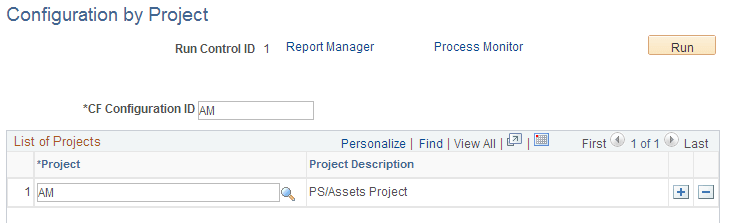
Use this page to configure objects delivered through a software fix to conform to your ChartField configuration
| Field or Control | Description |
|---|---|
|
CF Configuration ID |
Enter values to differentiate between runs if you want to run a configuration on each Project you are applying. In this way, you generate a Configuration report for each CF configuration ID without overwriting a previous configuration report. |
|
Project |
Enter the project name delivered with a software update or fix. |
The project configuration processes only the configuration actions that are in a Complete status. It compares the object list from the project against the CF_xxxx project and lists the objects that need manual changes. PS/nVision reports that are included in the fix need to be looked at manually.
Configuring ChartFields for Products Installed After an Initial Configuration
When a configuration of all installed products has been done previously and a new product is installed, the full configuration process must be run again to apply the requested configuration actions to the new product or products.