Processing Entry Events
This topic discusses how to run the entry event processor.
Pages Used to Process Entry Events
| Page Name | Definition Name | Usage |
|---|---|---|
|
PST_EE_RUN_REQUEST |
Runs the entry event processor to process Entry Event Process GLJEADJ for budget adjustment journal entries. |
|
|
PST_EE_RUN_REQUEST |
Runs the entry event processor to process Entry Event Process BUDG for budget journal entries. |
Entry Event Journals Page
Use the Entry Event Journals page (PST_EE_RUN_REQUEST) to run the entry event processor to process GLJEADJ for budget adjustment journal entries.
Navigation:
This example illustrates the fields and controls on the Entry Event Journals page. You can find definitions for the fields and controls later on this page.
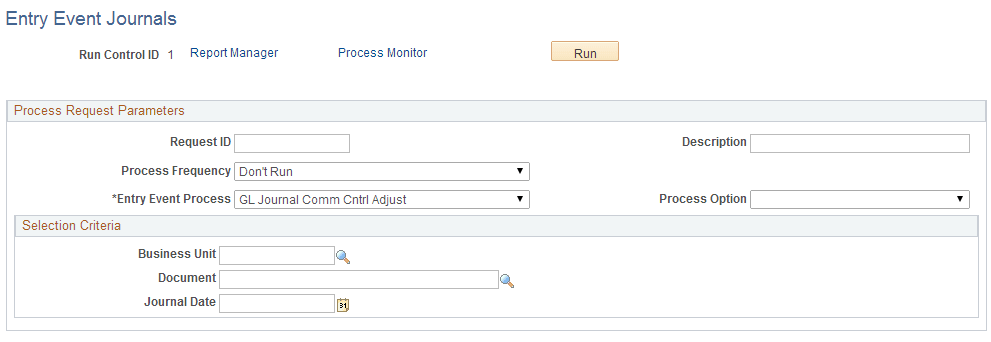
| Field or Control | Description |
|---|---|
|
Entry Event Process |
Select the name of the process to run. |
|
Process Option |
Options are: All Business Units: Run the process for every business unit that has transactions with entry events using this process. Business Unit: Specify a business unit in the Selection Criteria group box to run the process for that business unit. Document: Specify a particular document in the Selection Criteria group box to run the process for that document. |
|
Journal Date |
Enter a journal date to process the entry events on that date. This field appears only when you process Commitment Control budget and budget adjustment journals. |
Request Entry Event Processor Page
Use the Request Entry Event Processor page (PST_EE_RUN_REQUEST) to run the entry event processor to process Entry Event Process BUDG for budget journal entries.
Navigation:
This example illustrates the fields and controls on the Request Entry Event Processor page. You can find definitions for the fields and controls later on this page.
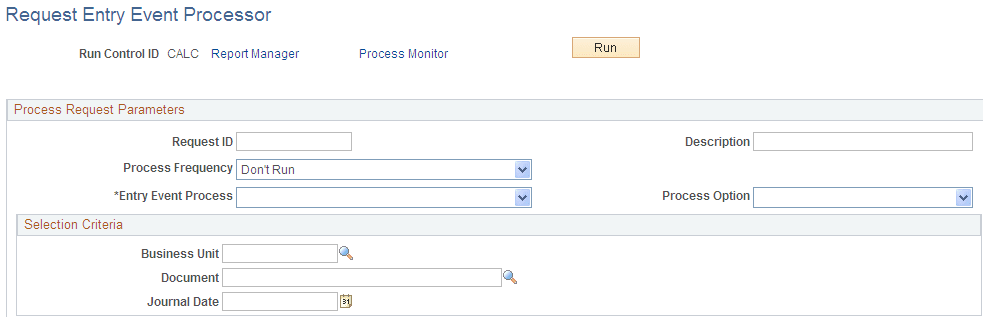
| Field or Control | Description |
|---|---|
|
Entry Event Process |
Select the name of the process to run. |
|
Process Option |
Options are: All Business Units: Run the process for every business unit that has transactions with entry events using this process. Business Unit: Specify a business unit in the Selection Criteria group box to run the process for that business unit. Document: Specify a particular document in the Selection Criteria group box to run the process for that document. |
|
Journal Date |
Enter a journal date to process the entry events on that date. This field appears only when you process Commitment Control budget and budget adjustment journals. |