Securing Access to Accounting Data
ChartField Security uses a different method to secure access to accounting information that is sourced from multiple transactions. Instead of securing access to the page, ChartField Security only displays the data that the user is allowed to access. This data typically includes inquiry components that display posted accounting data, such as GL Ledger Inquiry.
The following examples show the inquiry results. The first shows when ChartField Security is not enabled, and the second shows when it is enabled.
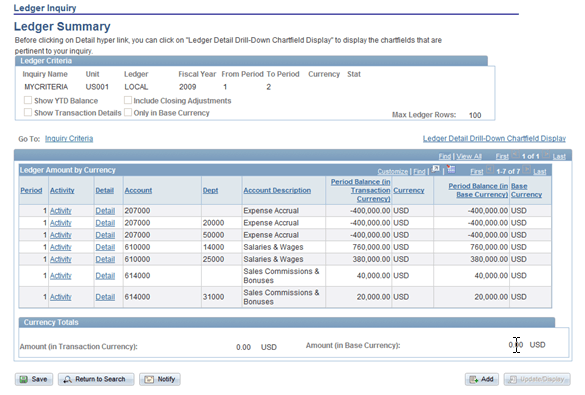
When ChartField Security is not enabled, all the ledger rows appear for the ledger criteria:
This example illustrates the fields and controls on the Not enabled ChartField Security. You can find definitions for the fields and controls later on this page.
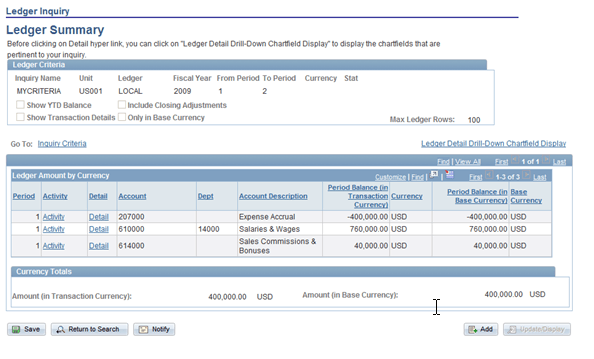
When ChartField Security is enabled, only the rows that the user is authorized to view appear. In this example, the user is only authorized to view department 14000:
This example illustrates the fields and controls on the Enabled ChartField Security. You can find definitions for the fields and controls later on this page.
Note:
Because ChartField Security restricts information in these components, you need to determine if security is required for certain users. For example, users who need access to all the information in order to perform their daily tasks will not require security. ChartField Security setup supports disabling security at the component level and overriding security for specific users.
Note:
The component security action option is not supported for these components.