Sending Notifications Using PeopleSoft Fluid Pages
Page Used to Send Notifications Using PeopleSoft Fluid Pages
| Page Name | Definition Name | Usage |
|---|---|---|
|
PC_EMAILER_FL |
Send an e-mail notification to an employee, an employee’s manager, or a resource. |
Understanding the Notify Page
The Notify page is a common page that can be accessed from multiple PeopleSoft Fluid pages. It is used to send an e-mail notification to an employee, a manager, a resource, a contract administrator, and more.
Typically, the notify option is available when you select the Related Action icon and then select Notify <option>. The Notify page is available from these pages, using this navigation:
-
PeopleSoft Project Costing: My Project Teams (pivot) Page, Related Actions, Notify Manager.
-
PeopleSoft Project Costing: Project Team Resources Page, Related Actions, Notify Resource.
-
PeopleSoft Project Costing: Project Financials (detail) Page, Related Actions, Notify Manager.
-
PeopleSoft Project Costing: Project Performance Page, Related Actions, Notify Manager.
-
PeopleSoft Project Costing: Project Timesheets Due (pivot) Page, Related Actions, Notify Resource.
-
PeopleSoft Project Costing: Project Timesheets Due (detail) Page, Related Actions, Notify Resource.
-
PeopleSoft Project Costing: Project Profit Margin (pivot) Page, Related Actions, Notify Manager.
-
PeopleSoft Project Costing: Contract Profit Margin (pivot) Page, Related Actions, Notify Contract Administrator.
-
PeopleSoft Project Costing: Project Unbilled Cost WIP (pivot) Page, Related Actions, Notify Manager.
-
PeopleSoft Project Costing: Project Status Reports Page (pivot), Related Actions, Notify Resource.
Notify Page
Use the Notify page (PC_EMAILER_FL) to send an e-mail notification to an employee, an employee’s manager, or a resource.
Navigation:
Select the Notify action from the Actions drop down list box on a PeopleSoft Fluid page.
This example illustrates the fields and controls on the Notify page.
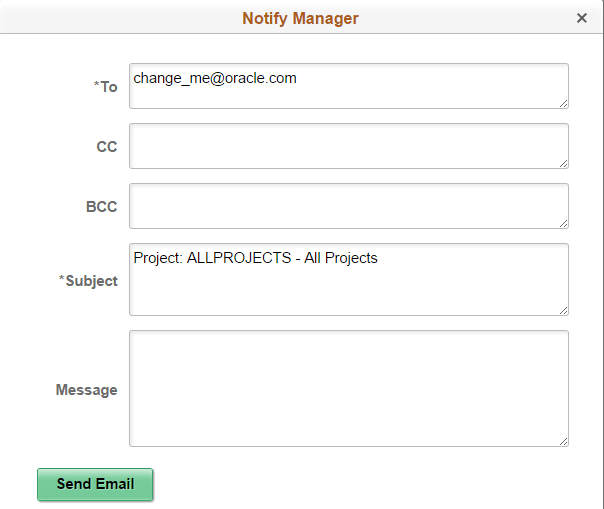
Use the Notify page to send a message to various individuals. Depending on the page from which you select the notify option, the system automatically completes some fields.
| Field or Control | Description |
|---|---|
|
To |
Review, add, or change the e-mail address for whom you want to send the notification. If you have set up e-mail addresses in your system, this field may be automatically completed by the system. |
|
Subject |
Review, add, or change the text in the subject field. Depending on the page from where you selected the notify option, the system automatically enters a subject. |