Understanding Allocations Steps and Process Group
Use the Define Allocation Step component (ALLOCATIONS) to do the following:
-
Select the allocation type.
-
Define the allocation pool.
-
Define the allocation basis.
-
Define the allocation target.
-
Define the allocation offset.
-
Select output options.
-
Select rounding and distribution of odd cents options.
-
Specify batch records.
-
Define amount fields.
Depending on its complexity, you can define an allocation by one or more process steps. Multiple steps represent a step-down allocation. These steps together form a process group, with each allocation identified by a unique group ID.
Each allocation step represents a discrete stage in the PeopleSoft Allocations process, which means that the process updates the ledger balances or creates journals at the end of the step. For example, you can perform a rent expense allocation in one step because you update the ledger only once to accomplish this allocation. But for more complex allocations, such as the distribution of administrative expenses across sales departments followed by the allocation of sales expense across products, you need two steps.
This diagram illustrates the use of multiple steps in an allocation processing:
Multiple steps in allocation processing
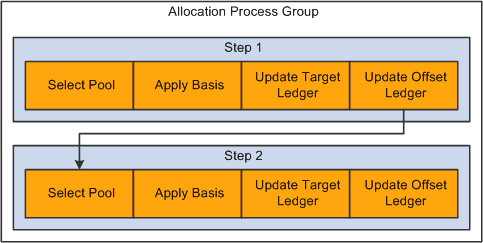
In this example, the first allocation step distributes administrative expense across the sales departments and then updates the ledger. If the ledger is not updated, the second step draws erroneous data from the ledger because the second step must allocate the newly updated sales expense across products.