Understanding How to Integrate with PeopleSoft Billing
PeopleSoft Asset Management integration with PeopleSoft Billing enables you to complete asset lifecycle processes, bill retire with sale transactions, and generate accounting entries in PeopleSoft Billing and PeopleSoft Asset Management. Using the AM/BI Interface process, you can pass asset Retire With Sale transactions from PeopleSoft Asset Management to PeopleSoft Billing to generate appropriate accounting entries to relieve fixed assets, calculate VAT as necessary, debit Receivables, and post to PeopleSoft General Ledger. You can also send asset reinstatements to PeopleSoft Billing as credit lines.
This diagram displays the data and process flow that occurs when you integrate PeopleSoft Asset Management with PeopleSoft Billing:
Data and process flow for integration between PeopleSoft Asset Management and PeopleSoft Billing:
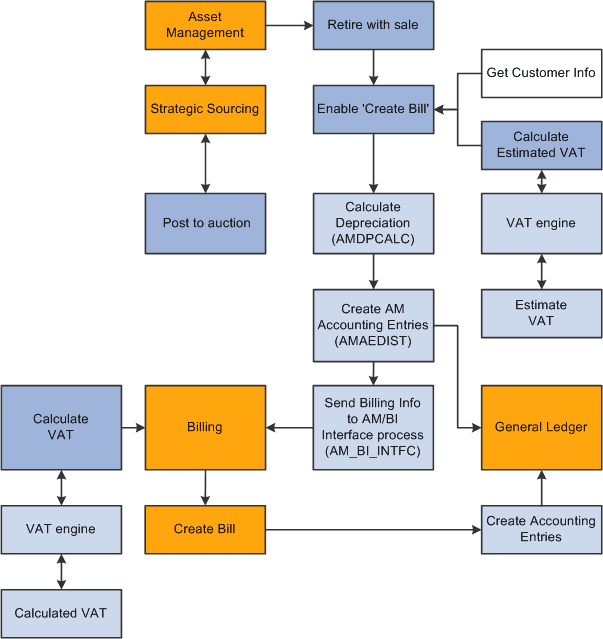
When an asset is retired by sale in PeopleSoft Asset Management:
-
Retire the asset with a sale in PeopleSoft Asset Management and collect the appropriate customer information within PeopleSoft Asset Management.
-
Send the transaction information and billing information to the Billing Interface using the AM/BI process (AM_BI_INFTC).
When PeopleSoft Strategic Sourcing puts an asset on an auction site for sale:
-
If the auction bid is awarded, PeopleSoft Strategic Sourcing sends the customer information and asset sold proceeds to PeopleSoft Asset Management to initiate and complete the retirement transaction with proceeds from bid price.
-
PeopleSoft Asset Management retires the asset and creates the appropriate accounting entries for sale.
-
You run the AM BI Interface process to send the retirement sales transaction and billing information to Billing.
Note:
You must collect customer information at the time of sale and send this information to PeopleSoft Billing with the retirement transactions, because assets can be purchased by an individual or entity not currently in the Customer Master table.
-
-
If the auction bid is not awarded, PeopleSoft Strategic Sourcing returns the asset to PeopleSoft Asset Management and changes the auction status to enable PeopleSoft Asset Management to realize any asset activity as a cost adjustment, transfer, or retirement.
PeopleSoft Asset Management interfaces with PeopleSoft Billing if you installed PeopleSoft Billing and if you:
-
Select the Billing Interface Processing option on the Asset Management Interface Options page, and set up a default billing business unit, bill type, bill source, and bill by identifier.
-
Select the Create Bill option on the Retire Assets page.
If PeopleSoft Asset Management interfaces with PeopleSoft Billing, PeopleSoft Asset Management sends the proceeds to the billing clearing account. PeopleSoft Asset Management sends to PeopleSoft Billing the proceeds clearing account to reflect both sides of the customer's debt. When PeopleSoft Billing receives the PeopleSoft Asset Management data, PeopleSoft Billing reverses the clearing account and generates the receivable account.
PeopleSoft Asset Management calculates an estimated VAT amount (if necessary), generates retirement and sales accounting entries, and posts the entries to PeopleSoft General Ledger. If PeopleSoft Asset Management interfaces with PeopleSoft Billing, you run the AM/BI Interface process to send the transactions to Billing to book the sale, create accounting entries, generate the invoice, and post the debt to PeopleSoft Receivables. If retirement is originated from PeopleSoft Strategic Sourcing, Asset Management does not send VAT information to Billing (Strategic Sourcing does not process VAT). If retirement is originated from Assets Management, Asset Management calculates VAT estimates only.
Note:
PeopleSoft Asset Management VAT is estimated, and PeopleSoft Billing VAT is the actual calculated VAT taking customer and bill-by information into account.
If a country allows the Domestic Reverse Charge VAT treatment and the corresponding VAT Asset Class and Customer are set to 'Domestic Reverse Charge, the Domestic Reverse Charge Sales Code will be carried to PeopleSoft Billing along with the calculated Domestic Reverse Customer Amount.
See PeopleSoft Global Options and Reports: Understanding VAT.