Business Unit Transaction Loader Page
Use the Business Unit Transaction Loader page (AM AM_WC_INTFC_BU) to review interface transactions and load them into Asset Management tables. Transaction data is organized by business unit. This page shares similar functionality with the Load Transaction to AM page and you can use either page to review interface transactions and load them into Asset Management tables.
Navigation:
This example illustrates the fields and controls on the Business Unit Transaction Loader page. You can find definitions for the fields and controls later on this page.
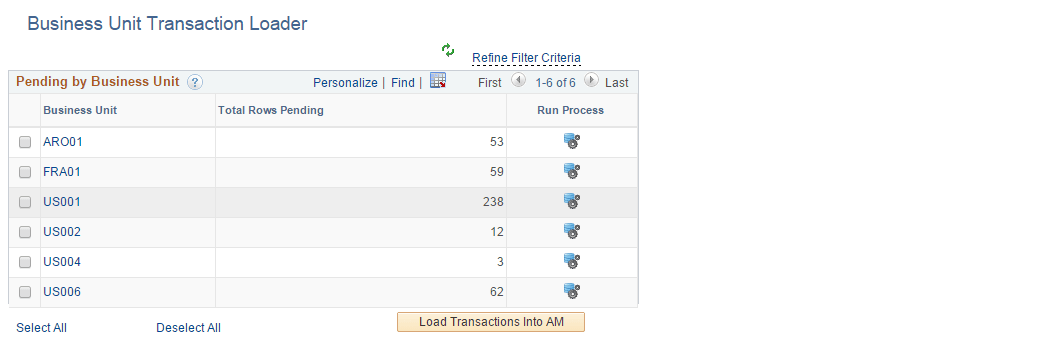
This example illustrates the fields and controls on the Business Unit Transaction Loader page. You can find definitions for the fields and controls later on this page.
| Field or Control | Description |
|---|---|
|
Business Unit |
Displays business units that have pending interface transactions. Select a business unit to run the Transaction Loader process (AMIF1000) against it, which will transfer the data from the interface tables into your Asset Management tables. Click a Business Unit link to display related interface transaction details in the Pending Transaction Details group box. |
|
Total Rows Pending |
Displays the total number of pending rows for a business unit. |
|
Run Process |
Click the icon to run the Transaction Loader process (AMIF1000) for the corresponding business unit in the row. The AMIF1000 process transfers data from the interface tables into your Asset Management tables. |
|
Load Transactions in AM |
Click to run the Transaction Loader process (AMIF1000) for one or more business units or interface IDs that you select on the page. |
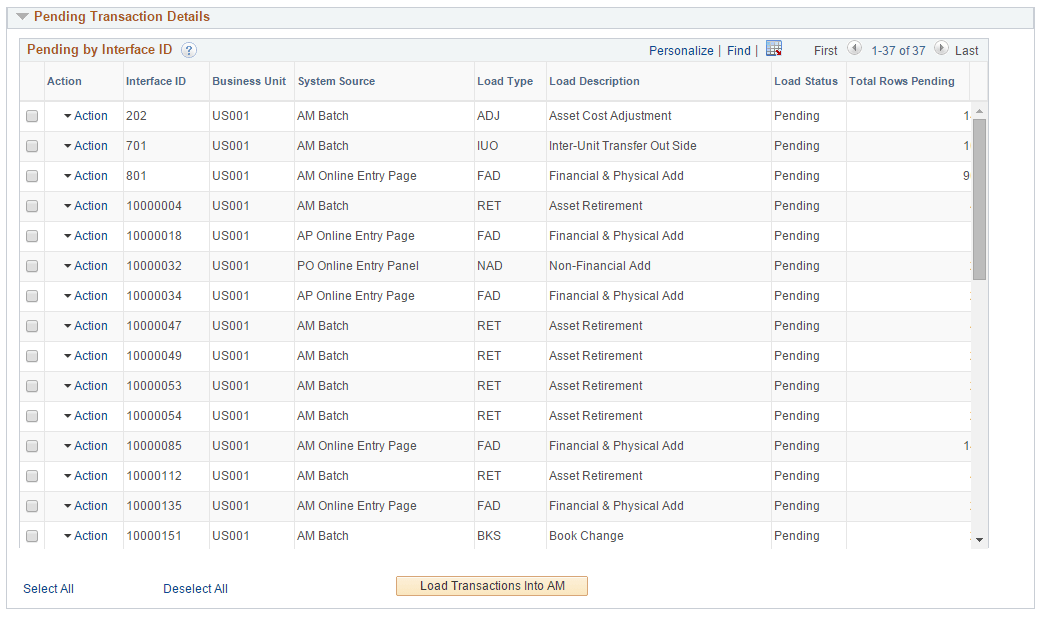
Pending Transaction Details
| Field or Control | Description |
|---|---|
|
Selection check box |
Select interface IDs that you want to process using the Load Transactions in AM button (which runs the Transaction Loader process, AMIF1000). The system will automatically select corresponding Interface IDs that share the same value. Once you run this process for an interface ID, you will not be able to select it again for future processing. |
|
Action |
Click the action link associated with an interface ID to open the Review Financial or Review Physical A pages. You must perform each action individually in the Action column by drilling into the action from this list. |
|
Interface ID |
Displays the interface IDs associated with a selected business unit. |
|
Business Unit |
Displays the business unit associated with the interface ID. |
|
System Source |
Identifies the source of an accounting entry from which a transaction arises. |
|
Load Type |
Displays the load type associated with the business unit and interface ID. |
|
Load Description |
Displays the load description associated with the business unit and interface ID. |
|
Load Status |
Displays the load status associated with the business unit and interface ID. |
|
Total Rows Pending |
Displays the total number of rows pending associated with the business unit, interface ID, and load type. |