Checking Out Assets
This topic discusses how to enter maintenance events and details.
Page Used to Check Out Assets
| Page Name | Definition Name | Usage |
|---|---|---|
|
ASSET_CHECKOUT |
Check out an asset that can be scheduled from available assets. |
Asset Checkout Page
Use the Asset Checkout page (ASSET_CHECKOUT) to check out an asset that can be scheduled from available assets.
Navigation:
This example illustrates the fields and controls on the Asset Checkout page. You can find definitions for the fields and controls later on this page.
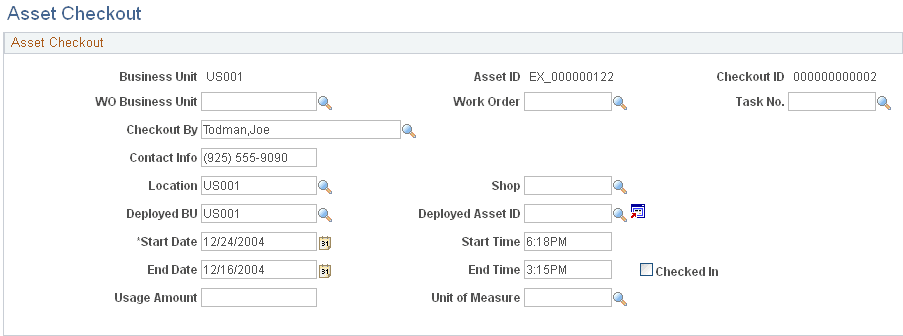
| Field or Control | Description |
|---|---|
|
WO Business Unit |
Select the business unit from which to select the work order for this asset. |
|
Work Order |
Select the work order to associate with this asset checkout. |
|
Task No. |
Select the task number associated with this checkout event. |
|
Checkout By |
Select the person who checked out the asset. |
|
Contact Info |
Enter any contact information regarding the checkout of this asset. |
|
Location |
Select the location by business unit for the asset. |
|
Shop |
Select the shop if applicable where the asset will be maintained. |
|
Deployed BU |
Select the business unit to which the asset is deployed. |
|
Deployed Asset ID |
Select the asset ID used when the asset is deployed. |
|
Start Date |
Enter the start date for the asset deployment. |
|
Start Time |
Enter the start time of the asset deployment |
|
End Date |
Enter the ending date of the asset deployment. |
|
End Time |
Enter the ending time of the asset deployment. |
|
Checked In |
Check this box when the deployed asset has been checked in. |
|
Usage Amount |
Enter the usage amount of the asset. For example, if the asset usage is tracked by a meter, a reading value can be entered. |
|
Unit of Measure |
Select the usage amount unit of measure type, such as miles, gallons, etc. |