Pending Accounting Entry Creation
Use the Pending Accounting Entry Creation page (AM_WC_AE_TRANS) to display and create accounting entries for one or more business units and asset IDs.
Navigation:
Click the Exceptions: Pending Accounting Entry Creation link.
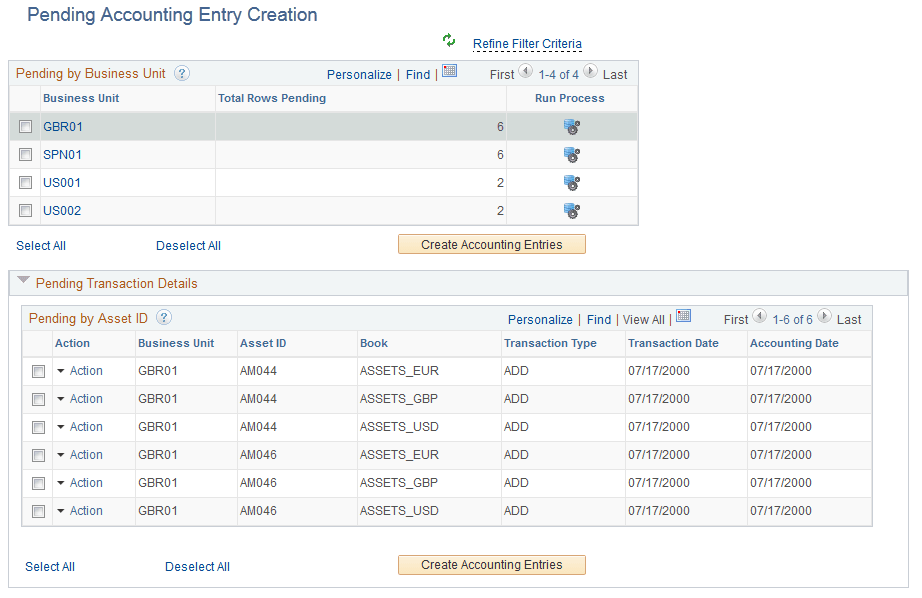
This example illustrates the fields and controls on the Pending Accounting Entry Creation Page.
| Field or Control | Description |
|---|---|
|
Action |
Click the action link associated with an item to open the Review Book or Review Cost or Open Transaction or Asset Depreciation pages. Each action in the Action column must be performed individually by drilling into the action from this list. |
|
Business Unit |
Click a Business Unit link to display transaction details for the selected business unit. |
|
Run Process icon |
Click the Run Process icon to run the depreciation calculation for the business unit associated with the row. |
|
Create Accounting Entries (by Business Unit) |
Select one or more business units in the Business Unit grid and click the Create Accounting Entries button to create accounting entries for selected business units. |
|
Create Accounting Entries (by Asset ID) |
Select one or more Asset IDs in the Transaction Details grid and the click the Create Accounting Entries button to Create Accounting Entries for selected Asset IDs. |