Pending AP/PO Transactions By
Use the options in the Pending AP/PO Transactions By group to review and act upon AP or PO Transactions filtered for the user.
Navigation:
Click Pending AP/PO Transactions By.
This example illustrates the fields and controls on the AP/PO Transactions By Business Unit page.
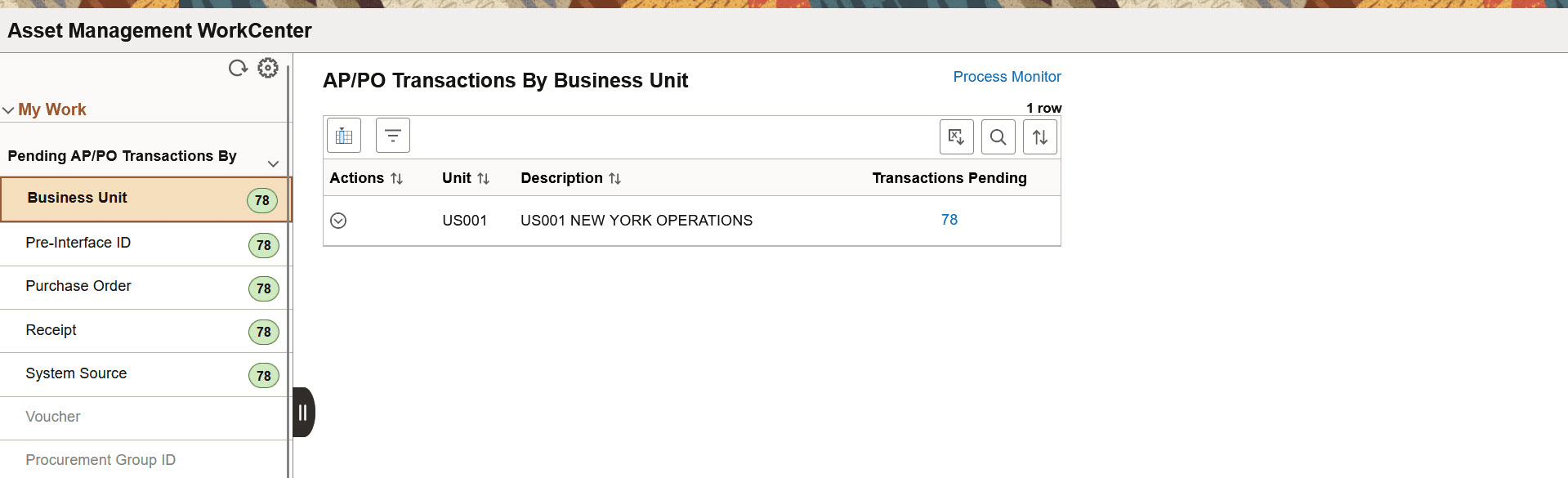
You can also find Pending AP/PO Transactions by the following options:
-
Business Unit
-
Pre-Interface ID
-
Purchase Order
-
Receipt
-
System Source
-
Voucher
-
Procurement Group ID
| Field or Control | Description |
|---|---|
 (Actions) |
Click the Actions button to perform the following actions:
|
|
Transactions Pending |
Click this hyperlink to view the transaction details for the number of pending transactions displayed. From the Pending Transactions page, you can review the interface, payment, and purchasing details. You can also navigate to other pages, such as View AP/PO Information, View PO Details, View Receiver Details, and View AP Details, by clicking the hyperlinks. |