Setting Up the Bank Statement Import Process
This topic discusses how to transform bank statement files to a PSBD layout, define bank statement balance codes and transaction codes, and set up a node for importing bank statements.
After you set up this functionality, you can import statements by using the Import Bank Statements page.
Related Topics
Pages Used to Set Up Bank Statement Import Functionality
| Page Name | Definition Name | Usage |
|---|---|---|
|
BSP_BAL_CODES |
Define bank statement code information. Also select three favorite statement balance codes to appear on online inquiry pages. |
|
|
BSP_TXN_CODES |
Define bank statement transaction code information, such as activity type and payment method. |
Transforming Bank Statement Files to a PSBD Layout
This section contains tables that can be used as guidelines for converting bank statement data into a PSBD1 layout, which is required for importing bank statement data files into the PeopleSoft system if Cash Management is not installed.
To import and load bank statements:
See Importing Bank Statements.
Note:
You can import bank statement data files using the PSBD2 layout if you have Cash Management installed and are using a third-party, communication toolkit that has the capability of processing files in XML format. Sample files that can be used as guidelines for transforming bank-statement date files into the PSBD2 layout can be found on My Oracle Support.
This table defines the PSDB1 layout:
| Record | Length | Field |
|---|---|---|
|
000 |
1 – 3 |
000 |
|
27 – 36 |
As of Date |
|
|
37 – 46 |
As of Time |
|
|
001 |
1 – 3 |
001 |
|
7 – 26 |
Bank ID Nbr |
|
|
27 – 61 |
Bank Account Number |
|
|
62 – 89 |
Beginning Balance (*) |
|
|
90 – 99 |
Beginning Date |
|
|
100 – 127 |
Ending Balance (*) |
|
|
128 – 137 |
End Date |
|
|
138 – 165 |
Available Balance (*) |
|
|
204 – 206 |
Currency Code |
|
|
002 |
1 – 3 |
002 |
|
7 – 26 |
Bank ID Nbr |
|
|
27 – 61 |
Bank Account Number |
|
|
62 – 81 |
Bank Transaction Code (also Statement Activity Type) |
|
|
82 – 109 |
Transaction Amount (*) |
|
|
110 – 119 |
Value Date |
|
|
120 – 129 |
Transaction Date |
|
|
130 – 144 |
Reference ID |
|
|
145 – 160 |
Bank Reference ID |
|
|
161 – 176 |
Description |
|
|
204 – 206 |
Currency Code |
|
|
003 |
1 – 3 |
003 |
|
62 – 89 |
Payment Amount (*) |
|
|
90 – 117 |
Discount Taken (*) |
|
|
118 – 145 |
Adjustment Amount (*) |
|
|
146 – 147 |
Adjustment Reason |
|
|
148 – 149 |
Reference Qualifier Code |
|
|
150 – 179 |
Reference Value From |
|
|
180 – 209 |
Reference Value To |
|
|
210 – 224 |
Customer ID |
|
|
225 – 254 |
MICR ID |
PeopleSoft provides support for signed amounts in bank statement data files using the PSBD1 layout when the following conditions are satisfied:
-
A PSBD1 file contains the bank statement code value between field positions 62 and 81 in record 002.
-
The Mapping Name BANK_STMT_CODE is set up on the Code Mapping page ().
-
The Bank Statement Code CR / DB value is configured as CR (credit) or DB (debit) on the Balance Codes page.
Balance Codes Page
Use the Balance Codes page (BSP_BAL_CODES) to define bank statement code information.
Also select up to three statement balance codes to appear on online inquiry pages.
Navigation:
This example illustrates the fields and controls on the Balance Codes page. You can find definitions for the fields and controls later on this page.
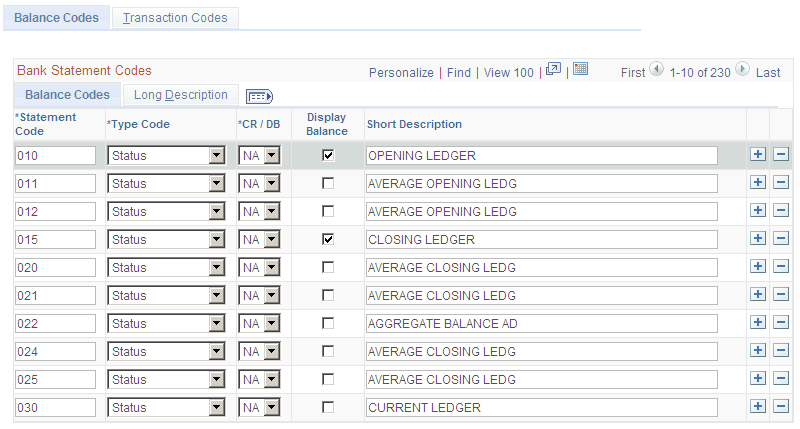
Balance codes are assigned to each balance line and determine how the reconciliation process handles them. Each balance entry that is received electronically or entered manually should be assigned a balance code.
| Field or Control | Description |
|---|---|
|
Statement Code |
Enter a three-digit statement code that is to be defined. |
|
Type Code |
Indicate if the code is a Status or Summary code. |
|
CR / DB (credit/debit) |
Indicate if the code is a CR (credit) or DB (debit), or select NA (not applicable) if this categorization does not apply. |
|
Display Balance |
Select this check box to indicate that the balance is a favorite balance. The system automatically displays the favorite balances on certain pages, such as the Bank Balance Inquiry page. You can select up to three different balances to be displayed. You can edit these selections at any time. |
Transaction Codes Page
Use the Transaction Codes page (BSP_TXN_CODES) to define bank statement transaction code information, such as activity type and payment method.
Navigation:
This example illustrates the fields and controls on the Transaction Codes page. You can find definitions for the fields and controls later on this page.
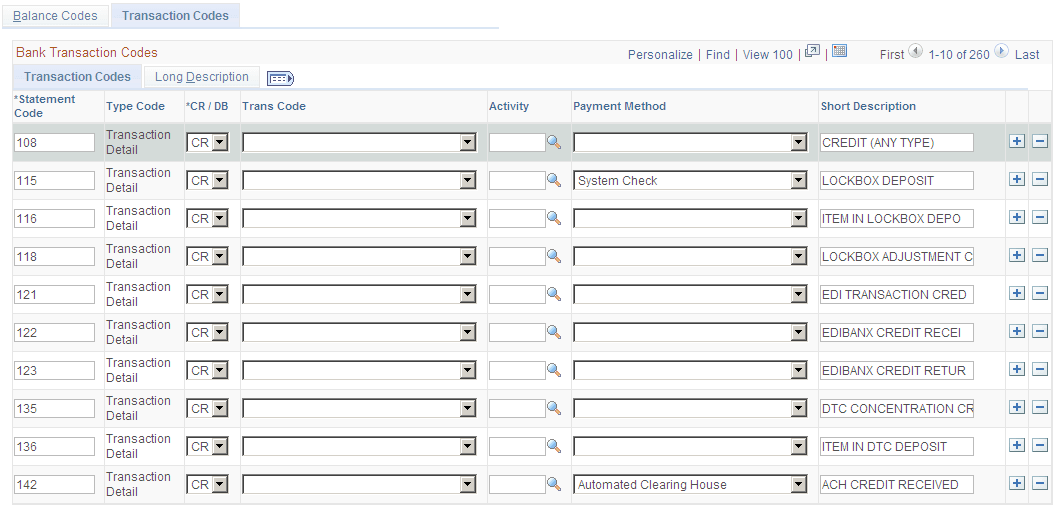
The system assigns transaction codes to each bank statement transaction line during electronic load or manual entry. The transaction code determines how the reconciliation processes the specific line item.
| Field or Control | Description |
|---|---|
|
Trans Code (transaction code) |
Identifies the type of transaction in a bank statement. Select from: Automated Clearing House Bank Adjustments Bill of Exchange - Disburse Bill of Order - Disburse Check Deposits Direct Debit Direct Debit - Disburse Drafts Electronic Funds Transfer Fee Expense Funding Receipt General Transaction Interest Expense Manual Check Miscellaneous Transaction Payment Stop Pay (stop payment) Trade Receipt Voided Payment Wire - Disbursement Wire - Incoming |
|
Activity |
Select a statement activity type. |
|
Payment Method |
Identifies the payment method that is specified for a transaction code. Select from: Automated Clearing House Direct Debit Draft - Customer EFT Draft - Customer Initiated Draft - Supplier Initiated Electronic Funds Transfer Giro - EFT (Giro-electronic funds transfer) Giro - Manual Letter of Credit Manual Check System Check Wire Transfer Payment Card |