Defining Customer Billing Contacts
To define customer billing contacts, use the Billing Specialist (BI_SPECIALIST), Bill Inquiry Phone (BI_INQPHONE), Team Member Personal Data (MEMBER_PERSON1), Collector (COLLECTOR_TABLE), and Credit Analyst (CR_ANALYST_TABLE) components.
Pages Used to Define Customer Billing Contacts
| Page Name | Definition Name | Usage |
|---|---|---|
|
BI_SPECIALIST |
Enter information for billing specialists and billing authorities. |
|
|
BI_INQPHONE |
Enter bill inquiry phone information. |
|
|
MEMBER_PERSON1 |
Set up team member information. |
|
|
COLLECTOR_TABLE |
Establish valid collectors. |
|
|
CR_ANALYST_TABLE |
Add or modify information for a credit analyst. |
Billing Specialist Page
Use the Billing Specialist page (BI_SPECIALIST) to enter information for billing specialists and billing authorities.
Navigation:
This example illustrates the fields and controls on the Billing Specialist page.
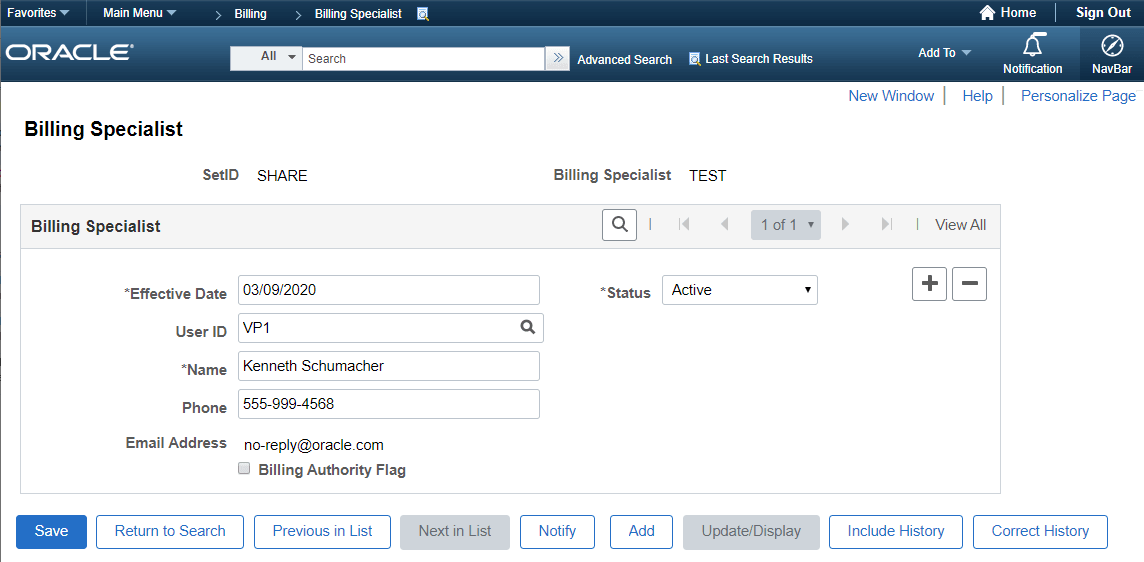
A billing specialist is anyone in an organization, including a manager, who is responsible for entering, monitoring, or approving system billing activity. Enter information for at least one billing specialist so that the table is properly established.
Note:
Before entering billing specialist information, you must create PeopleSoft user accounts for the specialists.
Add new billing specialists on the Billing Specialist page. To access the page, enter a billing specialist code, an 8-character code that can be any identifier that you want (for example, the person's initials). To indicate that the billing specialist is a billing authority, select the Bill Authority Flag check box and include the billing authority phone number.
See the product documentation for PeopleTools: Security Administration
Bill Inquiry Phone Page
Use the Bill Inquiry Phone page (BI_INQPHONE) to enter bill inquiry phone information.
Navigation:
The bill inquiry phone is the number on invoices for customers to call if they have questions about their bills. You can define as many bill inquiry phone numbers as needed. You can have different phone numbers based on where customers are located.
Specify when to have the bill inquiry phone number take effect in the Effective Date field, and indicate the status for the number.
Team Member Personal Data Page
Use the Team Member Personal Data page (MEMBER_PERSON1) to set up team member information.
Navigation:
Set up team member codes, formerly salesperson codes.