Managing Federal Highway Billing
This topic provides an overview of Federal Highway Billing for PeopleSoft Billing and discusses how to manage federal highway billing.
Pages Used to Manage Federal Highway Billing
| Page Name | Definition Name | Usage |
|---|---|---|
|
RUN_BI_FFEXT |
Create a federal highway file. |
|
|
RUN_BI_FFREC |
Recreate a federal highway file. |
Understanding Federal Highway Billing file
The Federal Highway file run control pages run an extract process to create a formatted text file. The text file will contain a Batch Control Record, Detail record and a Trailer Record.
Create Federal Highway File Page
Use the Create Federal Highway File page (RUN_BI_FFEXT) to create a federal highway file.
Navigation:
This example illustrates the fields and controls on the Create Federal Highway File page. You can find definitions for the fields and controls later on this page.
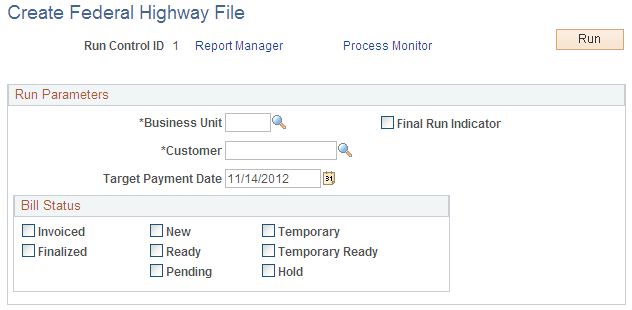
| Field or Control | Description |
|---|---|
|
Business Unit |
Select the Business unit. |
|
Customer |
Select the customer ID from the prompt list. |
|
Target Payment Date |
Select the date of payment. Target Payment Date is required when the Final Run Indicator option is selected. |
|
Final Run Indicator |
Select to determine whether to stamp the bill headers as final so they cannot be extracted again on future runs of the extract process unless the recreate file option is selected. |
|
Bill Status |
Select the bill status from the options. The available options are: Invoiced, Finalized, New, Ready, Pending, Temporary, Temporary Ready, and Hold. |
Recreate Federal Highway File Page
Use the Recreate Federal Highway File page (RUN_BI_FFREC) to recreate a federal highway file.
Navigation:
This example illustrates the fields and controls on the Recreate Federal Highway File page. You can find definitions for the fields and controls later on this page.
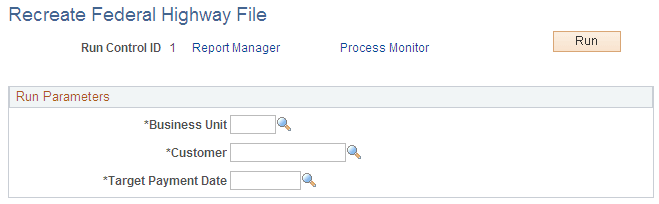
| Field or Control | Description |
|---|---|
|
Business Unit |
Select the Business unit. |
|
Customer |
Select the customer ID from the prompt list. |
|
Target Payment Date |
Select the date of payment. Target Payment Date prompt will list all target payment dates that have been used for previous final runs. |