Administering Nets
This topic discusses how to approve and cancel nets:
Pages Used to Administer Nets
| Page Name | Definition Name | Usage |
|---|---|---|
|
NET_NETTING_ADMIN |
Approve nets. |
|
|
NET_NETTING_ADMIN |
Cancel nets. |
Approve Netting Page
Use the Approve Netting page (NET_NETTING_ADMIN) to approve nets.
Navigation:
This example illustrates the fields and controls on the Approve Netting page. You can find definitions for the fields and controls later on this page.
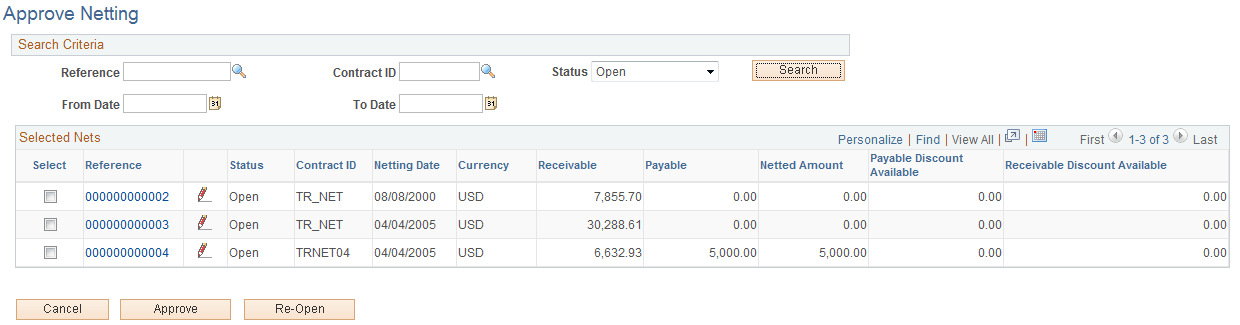
| Field or Control | Description |
|---|---|
|
Search |
Specify search criteria and click the button to retrieve data on multiple nets. Your results appear in the Selected Nets grid. |
|
Status |
Select from Approved, Cancelled, Closed, or Open. |
|
Reference |
Click the link to access the bilateral netting pages, and modify transaction information. |
|
|
Click to adjust the selected net. |
|
Select |
Select an item's check box, then approve or cancel net. The selected net(s) status changes to Approved or Cancelled. Once netting contracts are approved, they are "locked" and can't be edited. Select Re-Open to unlock approved netting contracts for modifications. |

Cancel Netting Page
Use the Cancel Netting page (NET_NETTING_ADMIN) to cancel nets.
Navigation:
This example illustrates the fields and controls on the Cancel Netting page. You can find definitions for the fields and controls later on this page.
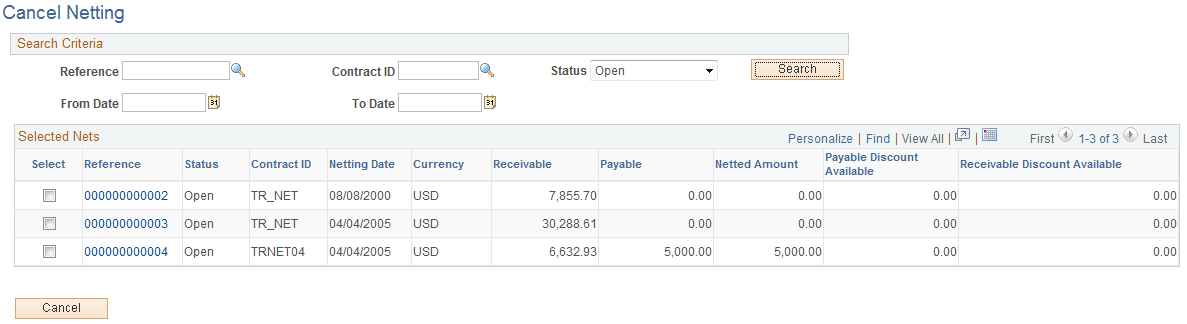
Page fields and functionality are similar to those discussed in Administering Nets. However, you can only cancel nets with an Open Status.
Related Topics