Defining Market Rates
Pages Used to Define Market Rates
| Page Name | Definition Name | Usage |
|---|---|---|
|
TRX_EXCHANGE_CD |
Define market and exchange information for a code. |
|
|
RT_RATE_TBL |
Specify criteria by which to review rates and to add or update rates. |
|
|
RT_RATE_PNL |
View details of a market rate, add a new market rate, and view exchange rate detail information. To set up history rates for existing market rates, use the component in Set Up Financials/Supply Chain - Common Definitions - Market Rates. |
|
|
RT_RATE_DEF_SEC |
Edit the maximum variance and error type information. |
|
|
Exchange Rate Detail Page |
EXCH_RT_DTL |
View exchange rate detail information. See the Market Rates - Market Rate Page. |
|
TRX_RT_RESET_CD |
Define and associate a holiday list ID to a rate reset code. |
Related Topics
Understanding Defining Market Rates
To define market and exchange codes, use the Market/Exchange Codes component (TRX_EXCHANGE_CD).
In addition to the PeopleSoft Common Definitions pages for defining and maintaining market rate data, Cash Management, Deal Management, and Risk Management use these additional market rate maintenance pages. These market rate pages enable you to specify criteria by which to retrieve and update multiple market rate definitions.
Use the market rate pages to:
-
Define market and exchange code information.
-
Define market rates.
-
View and add market rate information.
-
Edit rate variance information.
-
Define rate reset codes.
Market/Exchange Codes Page
Use the Market/Exchange Codes page (TRX_EXCHANGE_CD) to define market and exchange information for a code.
Navigation:
Market Rates Page
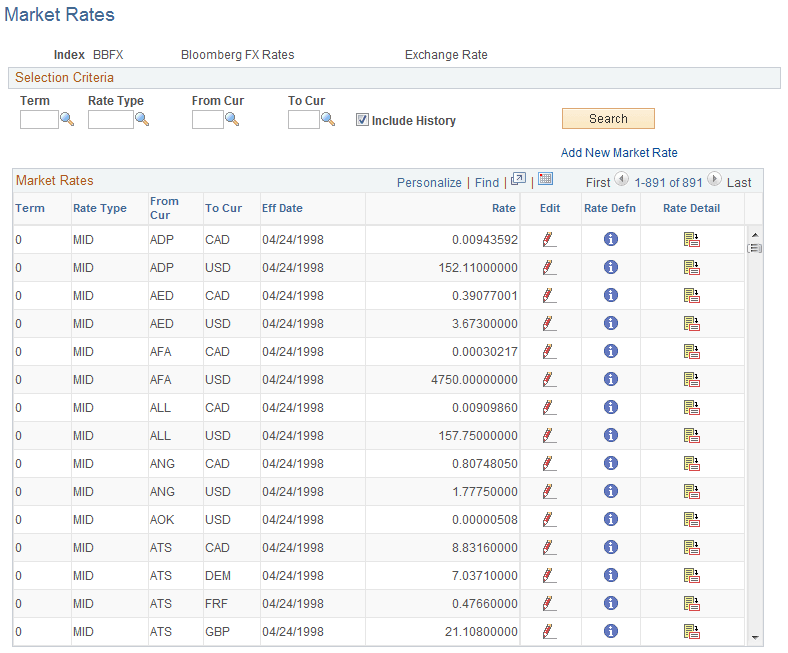
Use the Market Rates page (RT_RATE_TBL) to specify criteria by which to review rates and to add or update rates.
Navigation:
This example illustrates the fields and controls on the Market Rates page. You can find definitions for the fields and controls later on this page.
Note:
The appearance of this page varies depending on the market rate category.
Selection Criteria
Enter the criteria by which to retrieve existing market rate definitions.
| Field or Control | Description |
|---|---|
|
Term |
Specify a term code, indicating the length of time the rate is effective. |
|
Rate Type |
Select a market rate or exchange rate type. |
|
From Cur (from currency) and To Cur (to currency) |
Select the original and conversion currencies of the market rate. |
|
Include History |
Select to view market rate history for returned results. |
|
Add New Market Rate |
Click to access the Market Rates detail page and add a new rate type. The market rate definition (and, in the case of exchange rates, the currency quotation method for the from currency and to currency) must already exist. |
Market Rates
| Field or Control | Description |
|---|---|
|
|
Click the Edit button to access the Market Rates - Market Rate page, and edit effective date and rate information. Note: To set up history rates for existing market rates, use the component in Set Up Financials/Supply Chain - Common Definitions - Market Rates. |
|
|
Click the Rate Defn (rate definition) button to access the Rate Definition page, and view information on the rate's maximum variance, error type, and day count basis. |
|
|
Click the Rate Detail button to access the Exchange Rate Detail page, and view exchange rate detail information. |


Market Rates - Market Rate Page
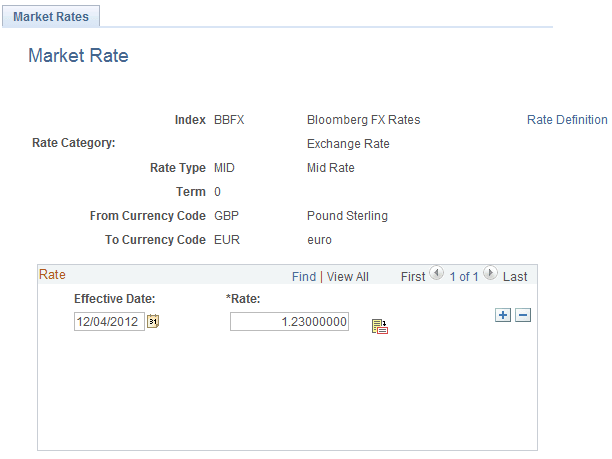
Use the Market Rates - Market Rate page (RT_RATE_PNL) to view details of a market rate, add a new market rate, and view exchange rate detail information.
Navigation:
Click Edit on the Market Rates page.
This example illustrates the fields and controls on the Market Rates - Market Rate page. You can find definitions for the fields and controls later on this page.
| Field or Control | Description |
|---|---|
|
Rate Definition |
Click to access the Rate Definition page, and edit variance and error type information for the rate definition. |
|
|
Click the Exchange Rate Detail button to access the Exchange Rate Detail page, and view rate information. |

Note:
To use this page to add or change past rates, use the navigation: Set Up Financials/Supply Chain, Common Definitions, Market Rates, Market Rates. You must be in the correction mode to make changes to historical data.
Related Topics
Rate Definition Page
Use the Rate Definition page (RT_RATE_DEF_SEC) to edit the maximum variance and error type information.
Navigation:
Click Rate Definition on the Market Rates - Market Rates page.
| Field or Control | Description |
|---|---|
|
Maximum Variance |
The variance value validates the rates read from the market rate loader process. The system compares the prior historical rate to the one read and ensures that it's within a specified variance. If not, you are alerted with the specified error type. Enter a new Maximum Variance, and specify an Error Type of None, Stop, or Warning. |