Reviewing Repetitive Transfers
Page Used to Review Repetitive Transfers
| Page Name | Definition Name | Usage |
|---|---|---|
|
TR_REPTVE_TRNF_PG |
Search for and maintain your organization's repetitive transfer templates. |
Review Repetitive Templates Page
Use the Review Repetitive Templates page (TR_REPTVE_TRNF_PG) to search for and maintain your organization's repetitive transfer templates.
Navigation:
This example illustrates the fields and controls on the Review Repetitive Templates page. You can find definitions for the fields and controls later on this page.
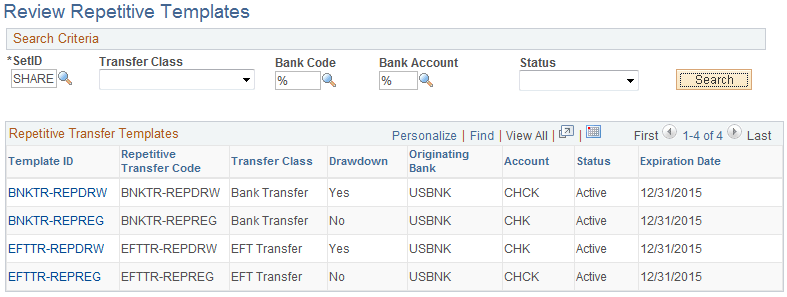
To maintain your repetitive transfers:
-
Enter your search criteria, and click the Search button.
-
From the returned results, click a Template ID to access the specific transfer template's information.
-
If you edit any information on the transfer template:
-
Click OK to save your changes and return to the Review Repetitive Templates page.
-
Click Cancel to discard your changes without saving, and return to the Review Repetitive Templates page.
-
Click Apply to save your changes without returning to the Review Repetitive Templates page.
-