Adding or Changing Enterprise Catalog Data
You use the Maintain Enterprise Catalog Data page to manually enter and change data about the enterprise catalog.
Pages Used to Add or Change Enterprise Catalog Data
| Page Name | Definition Name | Usage |
|---|---|---|
|
EOCM_ADD_PROD |
Manually enter and change data about the enterprise catalog and its associated partners' offerings. |
|
|
Partner Offering Detail page |
EOCM_SOFFDTL_SEC |
Review associated partner offering information. |
Maintain Enterprise Catalog Data Page
Use the Maintain Enterprise Catalog Data page (EOCM_ADD_PROD) to manually enter and change data about the enterprise catalog and its associated partners' offerings.
Navigation:
Select an enterprise catalog
This example illustrates the fields and controls on the Maintain Enterprise Catalog Data page.
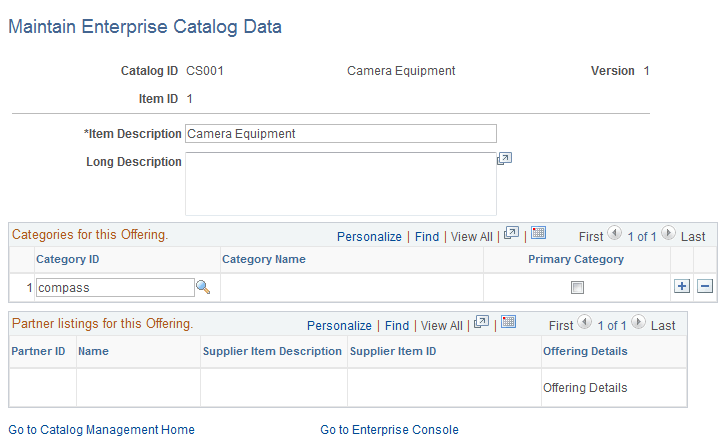
You use this page to:
-
Add new catalog offerings.
-
Modify catalog offering descriptions.
-
Add, remove, or change categories.
-
Review associated partner offerings.
Note:
New catalog offerings are added to the current working version of the enterprise catalog. Any catalog offerings that have been manually added can only be updated when they are either staged or in production.
| Field or Control | Description |
|---|---|
|
Category ID |
Change the existing category or add a new category. |
|
Primary Category |
Select to indicate the offering's primary category. This is the category used for Supply Chain Management. |
|
Offering Details |
Click to access the Partner Offering Detail page and view more information about an offering. |