Removing Partner Versions
This topic discusses the way to remove unused partner versions.
Page Used to Remove Unused Partner Versions
| Page Name | Definition Name | Usage |
|---|---|---|
|
EOCM_VER_REM |
Delete all the data for the selected partner version and clean up all the records that point to that partner version. |
Understanding the Removal Process
Catalog Management allows catalog managers and partners to load and maintain several different versions of a partner's data. Once a version is selected for production, all other versions are stored but not used again. The remove Unused Versions feature provides a way for the catalog manager to remove these unused partner versions.
Important:
Remove means deleting all the partner data. Once removed, the partner version cannot be retrieved.
Remove Versions Page
Use the Remove Versions page (EOCM_VER_REM) to delete all the data for the selected partner version and clean up all the records that point to that partner version.
Navigation:
Select an enterprise catalog.
Select a partner catalog.
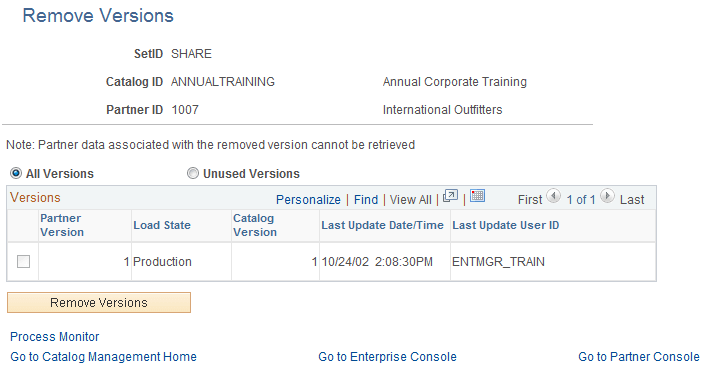
This example illustrates the fields and controls on the Remove Versions page. You can find definitions for the fields and controls later on this page.
| Field or Control | Description |
|---|---|
|
SetID and Catalog ID |
Values are based on the enterprise catalog selected on the Catalog Management Home page |
|
Partner ID |
Value is based on the partner catalog selected on the Enterprise Console. |
|
All Versions or Unused Versions |
Select All Versions to list all versions of partner data for this partner. Select Unused Versions to list only those versions that are no longer used (Default). |
|
Versions |
Displays a list of partner versions based on the previous selection, including these options:
|
|
Select |
Select the associated check boxes to select the partner versions you want to remove. The check box will be disabled for:
|
|
Remove Versions |
Click to run the application engine EOCM_REM_VER process. The process is submitted. Click the Process Monitor link to monitor the status of the request. Note: Once removed, the partner version cannot be retrieved. |