Budget Checking Process
Commitment Control enables you to check source transactions from many PeopleSoft and third-party applications against your control budgets.
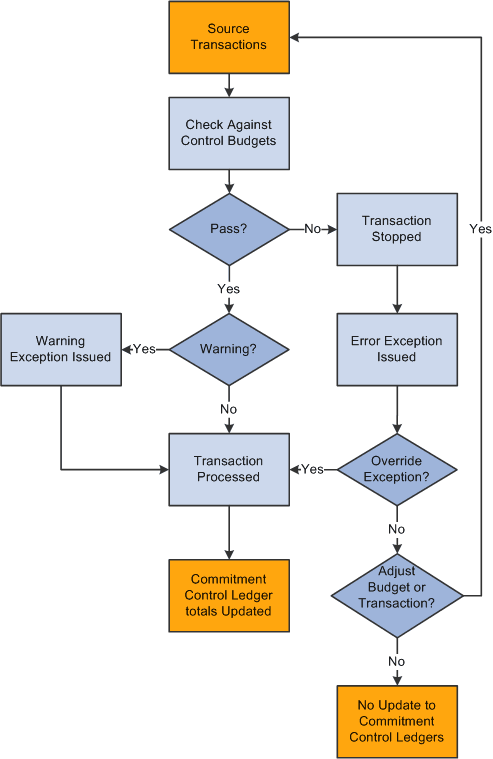
When a transaction exceeds the available budget amount, the system either stops the transaction and issues an error notice or passes the transaction with a warning notice, depending on the processing rules that you set up in your control budget definition, budget attributes, and source transaction type definition.
You can include expenditure budget tolerances and link revenue budgets to increase available spending, or remaining spending authority (RSA), for expenditure budgets. However, in the interest of simplicity, this introductory documentation and examples do not include tolerances and revenue budget linkage, which are discussed in detail in subsequent topics.
You can also set up Commitment Control to provide early warnings of possible future budget exceptions. Such warnings are triggered when commitments and expenditures reach a predetermined percentage of the total budgeted amount.
The following diagram provides a simplified view of Commitment Control budget-checking of source transactions showing warning and error exception handling through the update of Commitment Control ledgers.
Processing source transactions against control budgets
At the center of Commitment Control is the Budget Processor (FS_BP), an application engine process that performs both budget journal posting and transaction budget-checking.
Related Topics