Manage Control Budget Journal Approval Page
Use the Manage Control Budget Journal Approval page (KK_AF_JRNL_APPR_M) to approve, deny, or pushback single or multiple Commitment Control journals.
Navigation:
This example illustrates the fields and controls on the Manage Control Budget Journal Approval page. You can find definitions for the fields and controls later on this page.
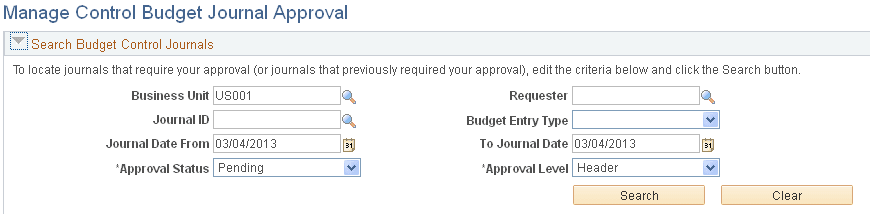
Supply the desired criteria and click the Search button. This action returns only those budget journals for which the current user is one of the approvers and that have not yet been posted or unposted. Click the Clear button to clear the search criteria.
| Field or Control | Description |
|---|---|
|
Business Unit |
Specify the Business Unit for your search. The user is limited to only those business units for which they have access. The default value is the user's specified business unit from the User Preferences - Overall Preferences page. |
|
Journal Date From and To Journal Date |
Default value for these fields is the current date. Enter date range for your search criteria. |
|
Approval Status |
Select the approval step status related to the current approver. Pending, Approved, Denied, or Pushed Back. This is a required field. |
Once you click the Search button, you are presented with the budget journals that match your criteria:
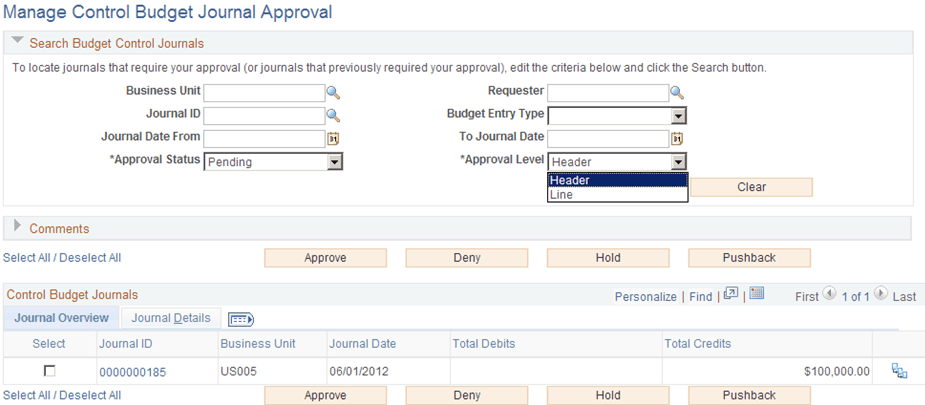
This example illustrates the fields and controls on the Manage Control Budget Journal Approval page (search results). You can find definitions for the fields and controls later on this page.
Comments
Expand the Comments group box to add a common comment for the selected budget journals at once and click the Add Comments button when finished entering. If you select only one journal, the comment applies only to that journal when you click the Add Comments button. If you enter comments before clicking any of the three action buttons, the comments will be saved to those journals' approval process.
Control Budget Journals - Journal Overview
| Field or Control | Description |
|---|---|
|
Select All / Deselect All |
Select all or deselect all journals by clicking the Select All / Deselect All link. Click once to select all and click again to deselect all (toggle link). |
|
Select |
Click to select one or several journals for which to apply the actions of Approve, Deny, Pushback, or Add Comments. |
|
Journal ID |
Click this link to access the individual Control Budget Journal Approval page. |
|
Business Unit |
Displays the anchor business unit of the journal entry. An entry does not appear for a unit for which an approver does not have access. |
|
Approve |
Select the journal (or journals) that you want to approve and click the Approve button to approve all selected journals at once. |
|
Deny |
Select the journal (or journals) that you want to deny and click the Deny button to deny all selected journals at once. |
|
Pushback |
Select the journal (or journals) that you want to push back and click the Pushback button to pushback all selected journals at once. |
|
View Approval Flow (icon) |
Click the View Approval Flow icon, which opens the Approval Flow page (KK_AF_APPR_MONITOR). |
|
View Attachment (icon) |
Select to view attachments (if present) for the journal. This opens the Approval Attachments page (KK_AF_APPR2_ATT_SEC). This secondary page is display-only. To add additional attachments as an approver, you must access the individual Control Budget Journal Approval page. See Adding Attachments Using the Budget Journal Approval Process. |
Control Budget Journals - Journal Details
Access the Journal Details tab on the Manage Control Budget Journal Approval page:
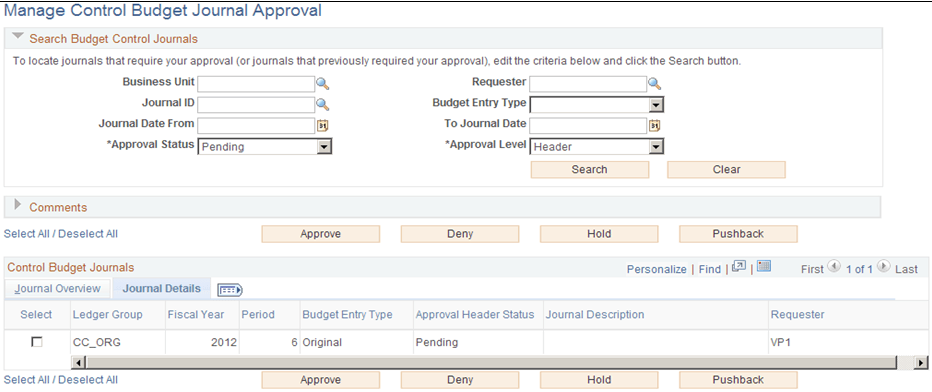
This example illustrates the fields and controls on the Manage Control Budget Journal Approval page - Journal Details tab.
Note:
The Status on the Journal Details tab is the overall approval status for the journal, while the Approval Status in the Search Journals section is the approval step status related to the current approver.
View Approval Flow
Use the Approval Flow page (KK_AF_APPR_MONITOR) to view the display-only approval flow graphic/
Note:
Access the individual Control Budget Journal Approval page to add adhoc approvers.
Navigation:
This example illustrates the fields and controls on the Approval Flow page. You can find definitions for the fields and controls later on this page.
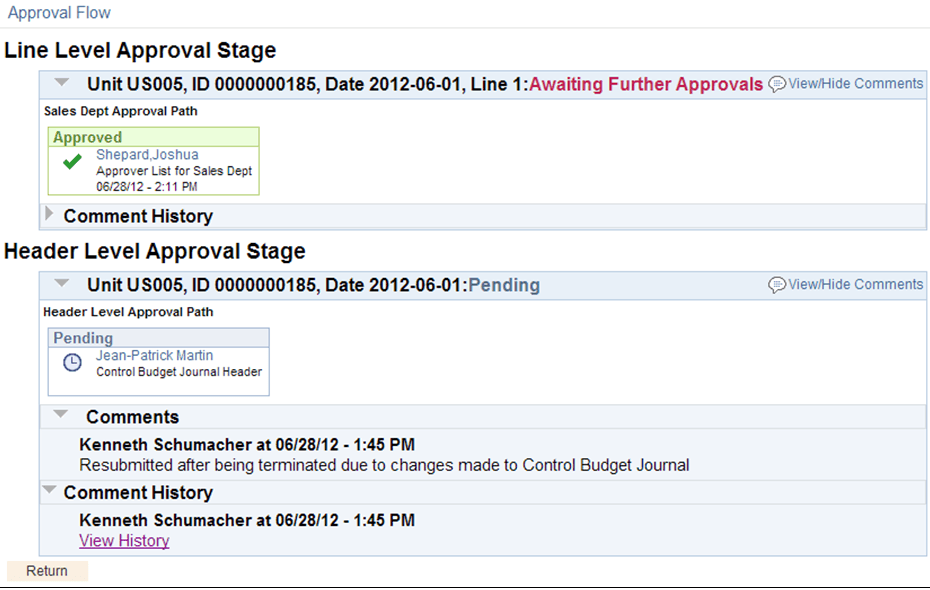
This page is display-only. You can drill to the individual Control Budget Journal Approval page to add adhoc approvers.
| Field or Control | Description |
|---|---|
|
View/Hide Comments (link) |
Click this link to show or to hide the associated comments. |
|
View Approver/Reviewer Information |
Click these links to open a modal window that shows the list of approvers/reviewers. |
|
View History |
Click these links to access the approval comment history for this journal. |