Understanding Transaction Costing and Accounting Entry Creation
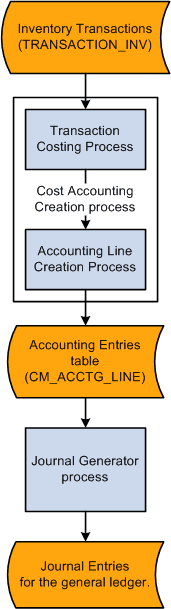
The inventory system posts inventory transactions into the TRANSACTION_INV table, then PeopleSoft Cost Management can assign costs to the transactions and create accounting entries. The Cost Accounting Creation process (CM_CSTACCTG) is an application engine process that completes these tasks by launching the:
-
Transaction Costing process (CM_COSTING). This application engine process picks up these inventory transactions and attaches costs to each transaction based on the item's cost profile.
-
Accounting Line Creation process (CM_ALC). This application engine process picks up the calculated costs, creates the accounting entries, and stores the entries in the CM_ACCTG_LINE table.
The Cost Accounting Creation process page launched both of these process using one run control page. This enables you to:
-
Streamline the maintenance of run control definitions.
-
Run both processes in a continuous stream without a break between steps.
-
Run just the Transaction Costing process or just the Accounting Line Creation process based on your current processing needs.
PeopleSoft Cost Management provides inquiries and reports to view the accounting entries. Use the Edit Unposted Accounting Lines page to change the accounting entries before they are posted to the general ledger. Once, you are satisfied with the entries, use the Journal Generator process (JRNL_GEN_REQUEST) to summarize the accounting entries into journal entries. PeopleSoft General Ledger can then post the journal entries to the correct ledgers.
This diagram illustrates the cost flow of inventory transactions from the TRANSACTION_INV record using the Transaction Costing process and the Accounting Line Creation process to produce accounting entries to be picked up and summarized by the Journal Generator process.