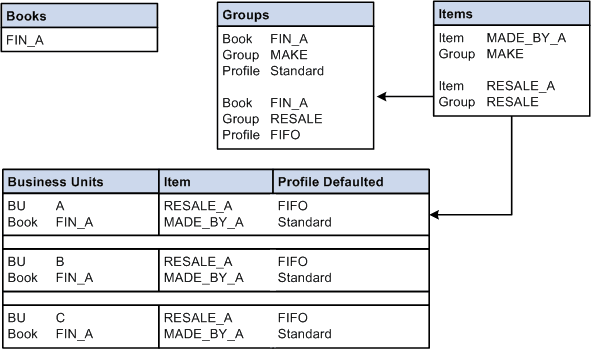
Using Different Cost Profiles in a Business Unit
This option allows you to select a costing method on an item-by-item basis. This method may be utilized in environments where you might want to track the cost of selected items by lot or serial ID and others by FIFO or LIFO actual costs and still others by using a weighted average. In this instance, you need to create cost profiles for all the costing methods you want to employ and standard cost groups to categorize the items according to the various costing methods. To do this, perform these steps:
-
Define a single cost book.
-
Define the cost profiles.
-
Define standard cost groups to categorize items according to the costing methods that are employed. Assign the book to each cost group. Select the appropriate cost profile for the cost group.
-
As items are created at the SetID level, assign them to the appropriate standard cost group.
-
Define the PeopleSoft Inventory business units, and point to a corresponding PeopleSoft General Ledger business unit. Add the book to the PeopleSoft Inventory business units and point it to the primary ledgers in the Default Ledger Groups for the PeopleSoft General Ledger business unit. If you manufacture items by using actual or average costing, also enter a cost type on the inventory business unit.
Now you are ready to add items to the PeopleSoft Inventory business unit. As you add items, the cost profile appears as the default value. No further set up is necessary.
This diagram illustrates how to select a cost method on an item-by-item basis.