Using Different Cost Profiles in Different Business Units
This scenario allows you to cost an item differently in each business unit. You could, for example, use the standard cost method for all of the items that are in one business unit and FIFO actual in another. To set up this scenario:
-
Define two or more books at the SetID level. Each book could represent a costing method. By using the preceding example, you could set up a book called FIN_A and FIN_B.
-
Define the different costing profiles that are used in each business unit. Examples are STD and FIFO.
-
Define a standard cost group. You could create a single group or multiple groups, depending on whether all items use the same costing method within a business unit.
-
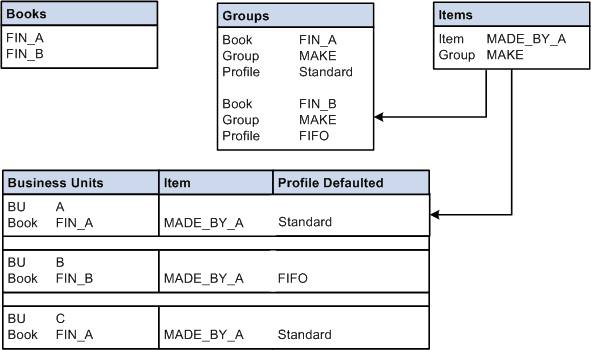
Assign both books to the standard cost group, and then assign a profile to each book. For example, cost group MAKE is assigned Book FIN_A and FIN_B. FIN_A uses the STD profile and FIN_B uses the FIFO profile.
-
Define the items at the SetID. Assign the items to a standard cost group (MAKE in this example).
-
Assign a book to a PeopleSoft Inventory business unit depending on the costing method that is used in the business unit. For this example, FIN_A is assigned to BU A; FIN_B is assigned to BU B.
-
Add items to each business unit. As items are added to BU A, they are assigned a costing profile of STD. As items are added to BU B, they are assigned a costing profile of FIFO.
This diagram illustrates how to cost an item differently in different business units.