Creating Position Manager Data Manually
This topic discusses how to enter manual position information, define additional search criteria, and copy data forward.
Pages Used to Create Position Worksheet Data Manually
| Page Name | Definition Name | Usage |
|---|---|---|
|
POS_GENERIC_ENTRY |
Search existing Position Manager data, and apply tree functionality to ad hoc data. This page is used to capture the data and begin structuring it so that you can connect it to an existing tree. |
|
|
POS_GEN_ENT_SRCH |
Increase the granularity of your search options. |
|
|
POS_GEN_ENT_COPY |
Specify date and repeat parameters for copying forward rows of position entry information. |
|
|
Additional Information |
POS_GENERIC_ENTRY |
Add supplementary information to the manual deal position entry. See the Enter Manual Deal Position Page for more information. |
Understanding How to Create Position Manager Data Manually
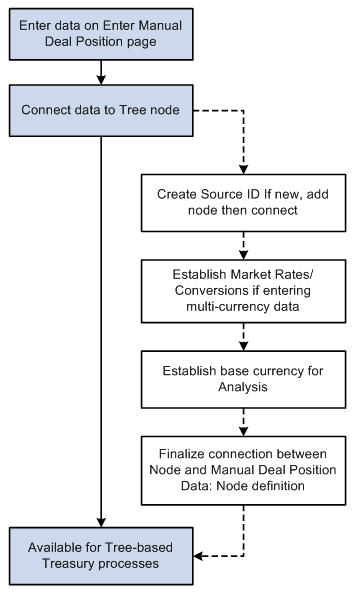
With manual deal position entry, you enter data manually, create a source over it, and then place the source on a particular tree node. This diagram shows an overview of the Manual Deal Position Entry process:
Overview of the Manual Deal Position Entry process
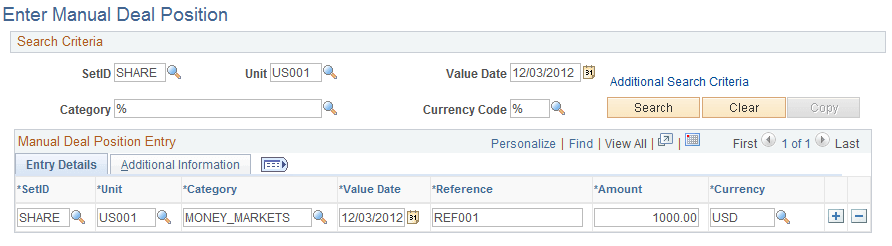
Enter Manual Deal Position Page
Use the Enter Manual Deal Position page (POS_GENERIC_ENTRY) to search existing Position Manager data, and apply tree functionality to ad hoc data.
This page is used to capture the data and begin structuring it so that you can connect it to an existing tree.
Navigation:
This example illustrates the fields and controls on the Enter Manual Deal Position page. You can find definitions for the fields and controls later on this page.
| Field or Control | Description |
|---|---|
|
Additional Search Criteria |
Click this link to access the Additional Search Criteria page (POS_GEN_ENT_SRCH), where you can narrow your search by selecting supplementary search categories. |
|
Category |
Displays another name for the target tree node. |
|
Copy |
Click to specify parameters for copying forward rows of position entry information. |
Note:
All lines that are added to the Manual Deal Position Entry grid must be of a currency for which an exchange rate is established; otherwise, the lines are not included in the generation of the Position Manager Results. Exchange rates are set on the Market Rates page.
Related Topics
Additional Search Criteria Page
Use the Additional Search Criteria page (POS_GEN_ENT_SRCH) to increase the granularity of your search options.
Navigation:
Click the Additional Search Criteria link on the Manual Deal Position Entry page.
| Field or Control | Description |
|---|---|
|
From Date and To Date |
Specify a date range for your data searches. Alternatively, you can specify to search on a particular day of the week, month, or day of the month. |
Manual Deal Position Entry - Copy Data Forward Page
Use the Manual Deal Position Entry - Copy Data Forward page (POS_GEN_ENT_COPY) to specify date and repeat parameters for copying forward rows of position entry information.
Navigation:
Click the Copy button on the Manual Deal Position Entry page.
| Field or Control | Description |
|---|---|
|
Date From and Date To |
Enter a date range to copy cells of position entry information into the manual position worksheet. You can also specify the number of times to repeat the copied information. |